Tech Ideas & Best Practices
Microsoft’s Copilot Cowork is a new AI-powered “co-worker” designed to autonomously plan and execute multi-step tasks across your work apps as a major leap beyond traditional chatbots. Launched in early 2026, Microsoft’s answer to Anthropic’s Claude Cowork (an AI agent introduced just weeks earlier). Copilot Cowork combines Anthropic’s Claude AI technology with Microsoft 365’s ecosystem, creating a digital assistant that works with you inside your day-to-day tools to boost collaboration and creativity. This post explores what Copilot Cowork is, how it compares to Claude Cowork, its key features and use cases, and how it can supercharge productivity for innovation teams.
What is Copilot Cowork?
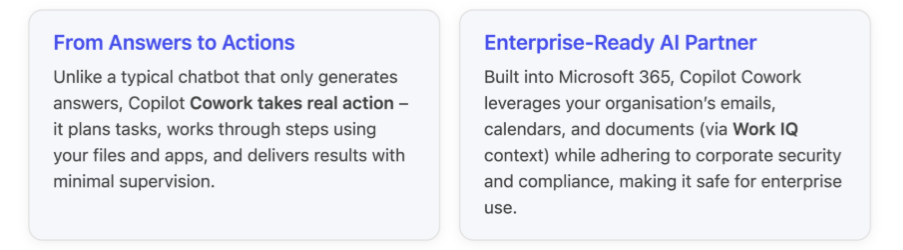
Copilot Cowork is an AI assistant that you can delegate work to, as if it were a capable team member. You describe the outcome you want, and Cowork generates a step-by-step plan, uses the necessary tools (like Office apps, calendars, email) and data to execute each step, and then presents the outcome.
For example, if you ask it to “prepare next week’s client update presentation,” Copilot Cowork can gather information from your emails and documents, draft slides in PowerPoint, schedule prep meetings on your Outlook calendar, and collate any relevant Excel stats, all while keeping you informed and allowing you to adjust the plan.
This agentic (“autonomous agent”) approach means Copilot Cowork isn’t just answering questions, it’s carrying out tasks on your behalf. It works within the Microsoft 365 cloud environment, drawing on Microsoft’s Work IQ intelligence layer (which aggregates your work data like mails, chats, files, and meetings) to provide rich context.
As a result, Copilot Cowork can do things like prepare a client meeting briefing by cross-referencing your recent email thread with that client, pulling data from a shared spreadsheet, and even blocking time on your calendar for preparation. This depth of integration into your work life is something a standalone AI agent (like a local app) can’t easily replicate.
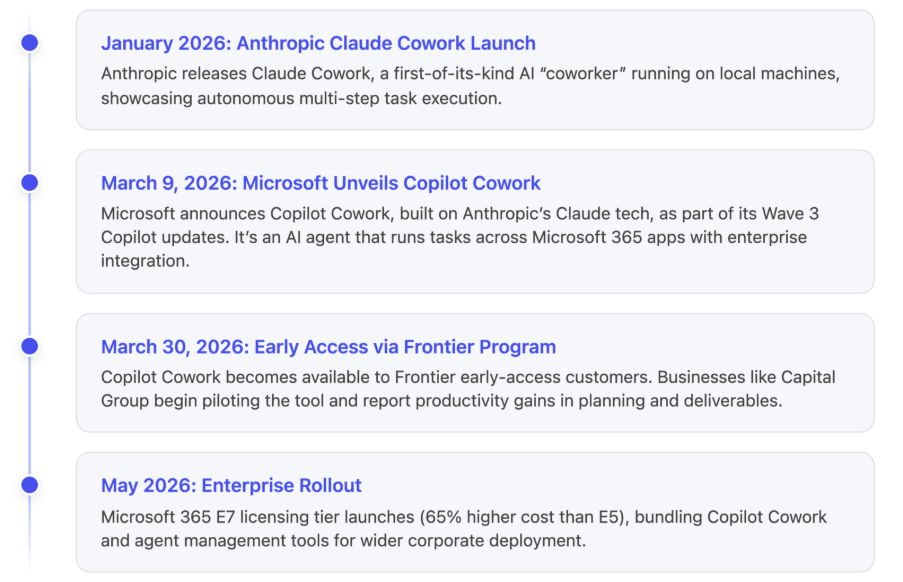
Notably, Microsoft built Copilot Cowork in close partnership with Anthropic, the AI company behind the Claude model. In fact, the underlying AI brain of Copilot Cowork is Anthropic’s Claude, integrated directly into Microsoft 365 Copilot’s infrastructure. Microsoft opted to collaborate instead of creating a new model from scratch after investing in Anthropic in late 2025, so it could bring Claude’s advanced capabilities into the enterprise setting quickly. Jared Spataro, Microsoft’s AI at Work chief, put it plainly: “What Anthropic has done is demonstrate the value of these agentic capabilities. Microsoft is all about commercialization.” In other words, Anthropic showcased the concept of an AI co-worker, and Microsoft scaled it for business use, leveraging its secure cloud, huge user base, and deep integration in workplace tools.
Key Features and Capabilities
Copilot Cowork introduces a range of powerful features aimed at making knowledge work more efficient and innovative:
- Autonomous Multi-Step Workflows - “Agentic” AI is the core of Cowork. You can delegate complex or repetitive workflows, and it will handle them from start to finish. It breaks your request into sub-tasks, executes them in sequence (or even in parallel when possible), and checks in if it needs guidance. For instance, if tasked with organizing a project kickoff, Copilot Cowork might create a project plan, draft an agenda in Word, schedule a Teams meeting with invitees, and set up a SharePoint folder for shared files doing in minutes what might take you hours.
- Contextual Intelligence via Work IQ – Because it’s built into Microsoft 365, Copilot Cowork has native access to your work context: your Outlook emails, Teams chats, OneDrive files, calendars, and more. It uses this Work IQ knowledge to make smarter decisions. For example, when drafting a document or email on your behalf, it can pull relevant facts from recent files or conversations. When scheduling or coordinating, it knows your real calendar availability and deadlines. This means the output is highly tailored to your actual work environment and team, which standalone AI tools can’t match.
- Multi-Model Collaboration (Claude + GPT) – Uniquely, Microsoft 365 Copilot (and the Cowork agent) takes advantage of more than one AI model to improve quality. Copilot Cowork can use OpenAI’s GPT for content generation and Anthropic’s Claude to review or refine the results, a feature called “Critique.” In Microsoft’s research agent tests, this two-model approach achieved a 13.8% higher deep-research accuracy score (DRACO benchmark) than a single-model answer. In practice, this means you get more accurate and well-rounded outputs – for example, a detailed analysis report written by GPT might be double-checked by Claude for factual accuracy and completeness before you see it1. Copilot can even display a Council of multiple model responses side-by-side for comparison, so you get the benefit of diverse AI “opinions” on complex problems.
- Seamless Microsoft 365 Integration – Copilot Cowork works across the apps you use every day. It can create or edit documents in Word, build slides in PowerPoint, analyze data in Excel, extract action items from Teams meeting transcripts, send emails via Outlook, and more, all through the same interface. In a demo, Microsoft showed Cowork automatically compiling a competitive analysis report by pulling information from meeting notes and customer data, outputting a Word doc and a supporting Excel sheet with charts. Because it operates inside the M365 apps, the formatting and file compatibility are taken care of your AI-generated content arrives in the tools you’re already comfortable with.
- Enterprise-Grade Security & Compliance – Designed for corporate environments, Copilot Cowork runs within your organization's secure Microsoft 365 cloud, so it respects all your established permissions, data governance, and auditing rules. Every action the AI takes whether it’s accessing a document or sending an email on your behalf it is logged and auditable by IT. Any files it creates or modifies are stored in your company’s secure cloud, with the usual access controls. This is a critical differentiator from local AI agents: for companies in regulated industries or with strict compliance needs, Copilot Cowork provides the transparency and control required to trust an AI with real work.
- Built-in “Skills” and Tool Integrations – Copilot Cowork comes with specialized capabilities (Microsoft calls them skills) to handle common tasks. For example, it has a calendar management skill to intelligently schedule or rearrange meetings (accounting time zones, availability, etc.), and a daily briefing skill that can summarise your day’s priorities. It can tap into the Microsoft Graph to retrieve contacts or past communications. Over time, Microsoft is likely to add more such skills (and allow custom ones), so the AI can interface with third-party tools or internal systems, further extending what tasks it can automate.
How Copilot Cowork Boosts Productivity and Innovation
For innovation teams and leaders, Copilot Cowork can be a gamechanger. By offloading routine and multi-step chores to the AI, teams can spend more time on creative, high-value work. Here are a few ways Copilot Cowork enhances productivity in collaborative and creative environments:
- Accelerating Project Workflows: Tedious project tasks like gathering status updates, scheduling meetings, or assembling reports can be handed to Copilot Cowork. For example, an innovation lead could ask, “Summarize this quarter’s R&D experiment results and prepare a slide deck with key findings.” Copilot Cowork will fetch data from the related documents and emails, generate a summary report, and draft slides complete with charts in PowerPoint. The team can then focus on refining strategy and brainstorming ideas, rather than crunching numbers and copy-pasting info.
- Enhanced Meeting Preparation: In collaborative work, a lot of time goes into meeting prep and follow-ups. Copilot Cowork shines here by digging through your organisational knowledge to prepare you for meetings. If you have a brainstorm scheduled, you can instruct Cowork: “Gather all recent customer feedback and product improvement ideas from our team chats and create a brief for the meeting.” It will scan your Teams channels and emails for relevant input and present a concise brief. After the meeting, you could ask it to compile action items and even draft follow-up emails. By doing heavy lifting, the AI frees everyone to concentrate on the creative discussion during the meeting, rather than on note-taking or clerical work.
- Continuous Planning and Coordination: Copilot Cowork can serve as an ever-ready project coordinator. For instance, innovation teams often run recurring processes (like monthly innovation reviews or budget planning cycles). Cowork can automate these repeatable workflows for a “monthly innovation portfolio review,” it could automatically pull the latest metrics from Excel, draft an updated report, and send calendar invites for review meetings every month. It ensures nothing falls through the cracks, and that processes run on schedule, with minimal manual effort.
- Cross-functional Collaboration: Because it operates with an awareness of shared files, team calendars, and group chats, Copilot Cowork can help connect dots between different team members’ work. Suppose the design team, engineering team, and marketing team are all working on a new product launch. Copilot Cowork can aggregate insights from each team’s files and chats to generate a combined update or to identify inconsistencies and information gaps in the plan. This not only saves time in chasing information but can also reveal insights that spark new ideas (for example, spotting a recurring customer concern in supporting tickets and bringing it to the product team’s attention).
- Example Early Adopter Success: One early adopter, Capital Group, reported significant benefits from Copilot Cowork. Their teams used it for planning, scheduling, creating deliverables, and preparing executive reviews, all within their secure Microsoft 365 environment. Barton Warner, SVP of Enterprise Tech at Capital Group, highlighted that Cowork isn’t just about generating text, “it’s about taking real action connecting steps, coordinating tasks, and following through across everyday workflows.” Equally important, he noted that because the AI works on their enterprise data within established security boundaries, they can “experiment, learn, and scale with confidence,” focusing on where AI truly adds value. In short, Copilot Cowork let their people move faster on innovation projects by handling the busy work reliably in the background.
Copilot Cowork vs. Anthropic Claude Cowork
Microsoft’s Copilot Cowork emerged very shortly after Anthropic’s Claude Cowork, and at first glance these two “AI coworkers” sound similar – both use Anthropic’s Claude model and both can execute multi-step tasks. However, they are built for different contexts and users. Here’s how they compare:
- Origins and Approach: Anthropic was first to debut the AI co-worker concept with Claude Cowork in January 2026, as a standalone desktop agent. It amazed many by showing an AI could perform lengthy, tool-using tasks on a PC. Microsoft’s response in March 2026 was not to compete directly, but to partner with Anthropic. Microsoft integrated the Claude cowork technology into its own Copilot product, essentially wrapping Claude’s capabilities inside the Microsoft 365 cloud environment. So under the hood, both tools leverage the same AI engine (Claude) for reasoning, but Microsoft adds its multi-model orchestration and enterprise integration on top.
- Integration and Environment: Claude Cowork runs locally on your device. This means it can, in theory, work across any application you have, giving it a lot of flexibility for individual power users. You don’t need Microsoft 365 at all, it’s an independent app. However, running locally also means it lacks built-in access to cloud-based organizational data. It can’t natively tap into a company like SharePoint or your team’s Exchange calendar because it operates outside that cloud ecosystem. Copilot Cowork, by contrast, lives inside Microsoft 365’s cloud. It’s deeply integrated with Office apps and leverages your company data (with permission) emails, SharePoint files, Teams channels, calendars via Work IQ. This makes it extremely powerful for enterprise use, because it operates with full awareness of your organizational context (something a local agent can’t achieve).
- Collaboration and Use Cases: Both tools can handle similar categories of tasks for example, calendar management, drafting documents, doing competitive research, preparing meeting summaries, and coordinating multi-document workflows. The big difference is who they serve. Claude Cowork is tailored more to individuals (developers, researchers, or small teams) who want an AI helper on their personal machine without corporate strings attached. It’s great if you’re a solo operator or a startup techie who needs an AI to automate tasks across various local apps (maybe coding, web research, file operations) and you don’t need it to know about an enterprise network. Copilot Cowork is built for enterprise teams already using Microsoft 365. Its sweet spot is in scenarios where multiple colleagues, shared cloud data, and organizational processes are involved exactly where having that enterprise context “pulls ahead for enterprise users”. For example, coordinating a cross-department project or generating a brief that draws on company-wide information is where Copilot Cowork excels, whereas Claude Cowork in those cases would be limited by only local data.
- Security and Governance: Because Claude Cowork runs locally, it inherently has limited oversight or governance there’s no automatic record of what it accessed on your machine or what it did, which might be acceptable for personal use but is a red flag in big organizations. In fact, any sensitive data it handles isn’t centrally tracked. Copilot Cowork, on the other hand, is cloud-based and auditable by default: all actions it takes in your Microsoft 365 tenant can be logged and reviewed. It adheres to your organization’s identity and access controls (only accessing data you’re allowed to) and keeps administrators in the loop. Microsoft even introduced a tool called Microsoft Agent 365 (available as an add-on) that lets IT monitor and manage AI agent activities across the company, set up policies, and catch any risky behavior. None of that structure exists for a local agent like Claude Cowork. For a CISO or compliance officer, this governance is often non-negotiable in enterprise settings.
- Availability and Licensing: Claude Cowork is available through Anthropic’s platform, typically as part of their Claude AI service subscription (with usage-based pricing). It can be used by anyone who signs up, without needing corporate approval. Copilot Cowork is offered to businesses; it requires a Microsoft 365 E5 subscription or the new E7 “Frontier” Suite (an even higher-tier package launching in 2026 that bundles all the AI goodies). In other words, an individual can’t just download Copilot Cowork an organization needs to enable it for their users. It’s currently in early access (via the Frontier programmer) as of March 2026, with broader rollout expected soon.
Below is a side-by-side comparison of Microsoft Copilot Cowork vs. Anthropic Claude Cowork in terms of features, integrations, and use cases:
A New Era of AI-Assisted Work
In summary, Copilot Cowork represents a new era of AI in the workplace moving from passively assisting with information to actively collaborating on real projects and tasks.
It’s like having a super-skilled assistant who can work at digital speed, attending meetings, reading documents, and producing drafts in parallel, all orchestrated under your guidance.
For innovation leads and forward-thinking teams, this means more time to innovate: the AI takes care of preparation and execution, while humans focus on creativity, strategy, and fine-tuning the results.
Meanwhile, Anthropic’s Claude Cowork shows another side of this evolution: a more open-ended AI agent for individual use, demonstrating what’s possible when an AI can control a computer like a human assistant would. Microsoft’s approach, however, is to bring that power into the everyday tools of business in a governed, scalable way.
By teaming up with Anthropic, Microsoft essentially turned a cutting-edge concept into a product that companies can deploy with confidence.
Conclusion
In a world where innovation and speed are paramount, tools like Copilot Cowork offer a significant edge. By handling the busywork researching, compiling, organizing, cross-checking, this AI frees human teams to concentrate on creative problem-solving and big-picture thinking. At the same time, its integration into the Microsoft 365 suite means it works where you work, securely and contextually, rather than being a disconnected novelty.
For organizations already invested in Microsoft’s ecosystem, Copilot Cowork can amplify productivity across departments. Imagine product managers, engineers, and designers all benefitting from an AI that coordinates their inputs and keeps the project in sync, or an innovation lab where ideas progress faster because the AI continuously gathers insights and takes care of follow-ups.
As AI coworkers become more common, we’re likely to see heightened collaboration between humans and AI. Microsoft Copilot Cowork and Anthropic Claude Cowork are early exemplars of this trend, one optimized for the enterprise, the other for individual power users. Both underline a shift from AI as a tool you consult, to AI as a partner that actively participates in the work.
For innovation leads, that means an exciting opportunity to reimagine workflows: routine tasks can be offloaded, and human talent can be re-focused on innovation itself. In essence, Copilot Cowork lets your team spend less time juggling tasks and more time driving innovation forward.
%201.png)
Microsoft Copilot Cowork: Your New AI Co‑Worker for Productivity and Innovation
Microsoft’s Copilot Cowork is a new AI-powered “co-worker” designed to autonomously plan and execute multi-step tasks across your work...

Introducing Microsoft Copilot Studio
Microsoft Copilot Studio is an innovative platform enabling businesses to easily create and deploy intelligent AI assistants integrated seamlessly into familiar Microsoft 365 applications. With custom-built conversational agents, your organization can significantly enhance productivity, collaboration, and employee engagement.
The February 2025 release introduces exciting new capabilities, ranging from seamless integration within Microsoft Teams to advanced analytics, enhanced security, and expanded multilingual support.
Yet, leveraging such powerful technology can feel daunting, especially for organizations without dedicated internal resources.
That's why SharePoint Designs is offering a Free 1-Hour Consultation to help you understand exactly how Copilot Studio can be integrated effectively into your business workflows.
What's New in Copilot Studio – Simplified
1. Publish Custom AI Agents Directly in Microsoft 365
Easily publish AI agents into Microsoft 365(Teams), allowing natural interactions within familiar apps.
2. Powerful Enterprise Data Integration
Connect your AI assistants seamlessly with enterprise platforms like Salesforce, GitHub, and Stack Overflow using built-in Microsoft Graph connectors.
3. Reusable AI Components
Accelerate AI development by reusing conversational flows, knowledge bases, and automation triggers across different agents.
4. Enhanced Analytics & Robust Security
Gain clear performance insights through advanced analytics and protect your organization with improved built-in security features.
5. Multilingual & Developer - Friendly
Build agents quickly in new languages and leverage JavaScript support, making development accessible to more teams globally.
How SharePoint Designs Becomes Your Extended AI Team?
At SharePoint Designs, we recognize many businesses don't have the luxury of an in-house AI development team. That's exactly why our consultative approach is designed to seamlessly fit your needs. We’re not just external consultants—we function as your dedicated in-house AI developers, fully invested in your success.
We support you by providing:
1. Tailored Consultation & AI Strategy
Our specialists provide in-depth guidance, aligning Copilot Studio’s capabilities directly with your business objectives.
2. Custom Agent Development & Deployment
Our developers build, configure, and deploy custom AI solutions specifically tailored to your unique workflows and brand identity.
3. Effortless Enterprise Data Integration
We expertly handle connecting your AI agents with the relevant enterprise data sources, ensuring your AI delivers meaningful and precise answers.
4. Continuous Analytics & Optimization
We proactively monitor your AI agents, using detailed analytics to refine their effectiveness continuously.
5. Security & Compliance Management
We provide proactive security management, ensuring your AI solutions meet compliance standards and remain protected from evolving threats.
Get Started Today with a Free 1-Hour Consultation
Not sure how to start, or simply want a clearer vision of what Copilot Studio can do specifically for your business? We invite you to take advantage of our Free 1-Hour Consultation.
In this session, our SharePoint Designs experts will help you:
- Understand how Microsoft Copilot Studio fits within your unique business context.
- Identify immediate opportunities for automation and productivity gains.
- Develop an actionable roadmap for implementing custom AI solutions quickly.
This complimentary consultation is your first step towards leveraging Microsoft Copilot Studio’s powerful capabilities effectively—with SharePoint Designs acting seamlessly as your extended development team.
Ready to explore AI’s potential for your business?
Claim your Free 1-Hour Consultation now and let SharePoint Designs guide you toward smarter, more productive ways of working.
Maximize Your AI Potential In-House with Copilot Studio & SharePoint Designs - No Hiring Overhead!
Microsoft Copilot Studio is an innovative platform enabling businesses to easily create and deploy intelligent AI assistants integrated seamlessly into familiar Microsoft 365 applications.
In the rapidly evolving world of app development, Microsoft Power Apps continues to lead the way with innovative features that simplify and enhance user experiences. One such groundbreaking addition is the Copilot Control—an AI-powered assistant that revolutionizes how users interact with data in canvas apps. By enabling natural language conversations, it generates insights and streamlines operations, making your apps more intuitive and efficient. Let's dive deeper into leveraging this innovative tool to elevate your app's functionality.
What is the Copilot Control?
The Copilot Control is an AI assistant powered by the Azure OpenAI Service, designed to transform data interaction within Power Apps. It allows users to engage with data intuitively through natural language, making complex queries and actions as simple as having a conversation. Whether it's fetching insights, responding to queries, or performing tasks like opening screens or sending emails, this feature enhances user engagement and productivity.
Key Capabilities:
- Natural Language Processing: Understands and processes user queries in plain language.
- Data Insights: Generates real-time insights from your Dataverse data.
- Actionable Responses: Can initiate actions within the app, such as navigating to screens or triggering workflows.
- Customization: Fully customizable to align with your app's branding and functionality.
Getting Started: Prerequisites
Before integrating the Copilot Control, ensure you have the following:
- Supported Environment: Verify that your environment meets the requirements outlined in the Copilot in Power Apps overview.
- Feature Enablement: A Power Platform administrator must enable the feature via the Power Platform admin center.
- Data Source: Have a Dataverse table set up as your data source, as this is currently the only supported option.
Note: Copilot control is currently a preview feature and is not intended for production use. It may have limited functionality and could undergo significant changes in future updates.
Step-by-Step Guide to Adding Copilot Control
1. Enable Copilot Features
- Open your canvas app for editing in Power Apps Studio.
- On the command bar, select Settings > Updates.
- Navigate to the Preview tab.
- Find and turn on the Copilot component and Edit in Copilot Studio settings.
2. Insert Copilot Control
- In the app authoring menu, go to Insert > Copilot (preview).
- Select the Copilot control to add it to your canvas.
- Connect the Copilot to a Dataverse table as the data source by setting the Items property.
3. Customize Your Copilot
- With the Copilot control selected, click on Edit in Copilot Studio.
- In Copilot Studio, you can:
- Define Topics: Specify the subjects or data areas the Copilot should focus on.
- Set Actions: Determine what actions the Copilot can perform, such as creating records or navigating to screens.
- Customize Responses: Tailor the language and tone of the Copilot's replies to match your app's voice.
- Configure Behavior: Adjust settings for how the Copilot interacts with users, including error handling and feedback mechanisms.
Tips for Effective Customization:
- Understand User Needs: Consider the common queries and tasks your users perform and tailor the Copilot to facilitate these actions.
- Maintain Consistency: Ensure the Copilot's responses align with your organization's branding and communication style.
- Test Thoroughly: Regularly test the Copilot's interactions to refine its performance and address any issues.
Maximizing the Experience
Feedback Collection
- The Copilot Control includes a feedback mechanism where users can rate responses or provide comments.
- This feedback is invaluable for refining the AI model and improving the assistant's performance over time.
- If you prefer to disable feedback collection, adjust the Allow users to provide feedback setting in the Copilot's properties.
User Empowerment
- Real-Time Interactions: Copilot enables users to interact with data dynamically, reducing the need for complex navigation or multiple clicks.
- Accessibility: Simplifies the user experience, making your app more accessible to users who may not be familiar with the underlying data structures.
- Efficiency: By handling routine queries and actions, Copilot frees up time for users to focus on more strategic tasks.
Why Add Copilot Control?
Integrating the Copilot Control into your canvas apps offers several compelling benefits:
1. Enhanced Productivity
- Streamlined Workflows: Users can accomplish tasks faster through conversational interactions.
- AI-Driven Insights: Provides intelligent suggestions and data analysis that might be time-consuming to generate manually.
2. Customizability
- Tailored Experience: Customize the Copilot to meet the specific needs of your users and business processes.
- Scalability: As your app evolves, easily update the Copilot's capabilities to match new functionalities.
3. Future-Ready Solutions
- Innovation Leadership: Early adoption positions your organization at the forefront of Power Apps innovations.
- Continuous Improvement: Gain access to the latest features and improvements as Microsoft enhances the Copilot service.
Best Practices for Using Copilot Control
- Data Security: Ensure that the data accessed by Copilot complies with your organization's security policies and that sensitive information is protected.
- User Training: Provide guidance to users on how to effectively interact with Copilot to maximize its benefits.
- Monitor Performance: Regularly review Copilot's interactions to identify areas for improvement and to ensure it meets user expectations.
- Stay Updated: Keep an eye on updates from Microsoft regarding Copilot features and enhancements, as the preview version may change.
Conclusion
The Copilot Control in Power Apps exemplifies how AI can reshape app development by making data interactions more conversational and dynamic. It not only boosts user satisfaction but also sets the stage for a smarter, more efficient workflow. By embracing this feature, you're not just enhancing your apps—you're pioneering a new era of intuitive and intelligent user experiences.

Add Intelligence to Your Canvas Apps with AI
In the rapidly evolving world of app development, Microsoft Power Apps continues to lead the way with innovative features that simplify and enhance user experiences.
In today's fast-paced digital landscape, leveraging advanced technologies like Generative AI is becoming essential for businesses aiming to stay competitive. Microsoft Copilot Studio, a versatile AI-powered platform, is designed to transform how organizations operate by automating tasks, enhancing productivity, and providing deep insights. Below, we explore the top 10 use cases for Microsoft Copilot Studio and highlight the benefits of utilizing Generative AI in these scenarios.
1. Personalized Task Automation
Example: Automating Weekly Reports Imagine needing to send a weekly report to your manager every Friday. With Copilot Studio, you can automate this process. The tool can automatically pull the latest data, format the report, and email it to your manager.
Benefit: This automation saves time, reduces repetitive work, and ensures consistency in reporting. Employees can focus on more strategic tasks, enhancing overall productivity.
2. Enhanced Data Analysis
Example: Sales Data Dashboard You need to analyze sales data for the past year to identify trends. Copilot Studio can help you create a Power BI dashboard that updates automatically and highlights critical insights, such as top-performing products and regions.
Benefit: Quickly turning raw data into actionable insights empowers better decision-making and strategic planning, giving your business a competitive edge.
3. Intelligent Meeting Management
Example: Meeting Preparation and Summaries Before a meeting, Copilot can gather all relevant documents, create an agenda, and, after the meeting, summarize key points and action items.
Benefit: This ensures everyone is well-prepared and helps maintain a clear record of decisions and tasks, improving meeting efficiency and follow-through.
4. Content Generation and Summarization
Example: Summarizing Reports When you need to write a summary of a 20-page report, Copilot can read the report and generate a concise overview for you.
Benefit: This feature saves significant time and ensures that important information is captured accurately and consistently, facilitating better communication and understanding.
5. Customer Service Optimization
Example: AI-Powered Chatbots A customer sends an inquiry, and an AI chatbot created with Copilot Studio responds immediately, providing answers to common questions or directing the inquiry to the correct department.
Benefit: Enhances customer experience by providing immediate responses and reduces the workload on human agents, allowing them to focus on more complex issues.
6. Employee Onboarding and Training
Example: Personalized Training Programs New hires need to complete several training modules. Copilot can create a personalized training schedule and provide interactive content tailored to each new hire's role.
Benefit: Streamlines the onboarding process and ensures new employees receive the necessary training, helping them become productive faster.
7. Project Management Assistance
Example: Tracking Project Progress Managing a project with multiple deadlines and team members can be challenging. A copilot can help track progress, remind team members of upcoming tasks, and highlight potential delays.
Benefit: Keeps projects on track, ensures everyone is aware of their responsibilities, and helps in timely project completion, enhancing overall project efficiency.
8. Sales and Marketing Insights
Example: Analyzing Marketing Campaigns You want to understand the most effective marketing campaigns. Copilot can analyze customer data and campaign results to show which efforts drive the most sales.
Benefit: Helps focus marketing efforts on strategies that yield the best results, improving ROI and marketing efficiency.
9. Compliance and Risk Management
Example: Monitoring Regulatory Compliance Your company needs to comply with new regulations. Copilot can monitor your processes, automatically generate compliance reports, and alert you to potential issues.
Benefit: Ensures your company stays compliant with less manual effort, reducing the risk of penalties and enhancing overall governance.
10. Enhanced Collaboration Tools
Example: Collaborative Document Editing Your team is working on a shared document. Copilot can suggest edits, track changes, and help schedule collaboration sessions in Teams.
Benefit: Facilitates seamless collaboration, even among remote teams, ensuring everyone stays on the same page and improving the quality of collaborative work.
Benefits of Utilizing Generative AI with Microsoft Copilot Studio
1. Increased Efficiency
Generative AI can handle repetitive tasks, allowing employees to focus on more strategic activities. This increases overall efficiency and productivity.
2. Improved Decision-Making
By analyzing large datasets and generating insights, Generative AI supports better decision-making. It helps businesses identify trends, opportunities, and potential risks quickly.
3. Enhanced Customer Experience
AI-powered tools can provide immediate responses and personalized interactions, significantly improving customer satisfaction and loyalty.
4. Cost Savings
Automating tasks reduces the need for manual labor, leading to cost savings. Additionally, AI-driven insights can help optimize resource allocation and reduce waste.
5. Scalability
Generative AI solutions can scale quickly to meet the growing demands of the business. Whether handling more data, more users, or complex tasks, AI can adapt and grow with the organization.
Conclusion
Microsoft Copilot Studio, powered by Generative AI, offers a multitude of use cases that can transform how businesses operate. The benefits are clear, from automating routine tasks to providing deep data insights. By leveraging these capabilities, organizations can enhance productivity, improve decision-making, and deliver superior customer experiences. As we navigate the digital age, embracing tools like Microsoft Copilot Studio will be crucial for maintaining a competitive edge and achieving sustained success.

Top 10 Use Cases for Microsoft Copilot Studio: Harnessing the Power of Generative AI
In today's fast-paced digital landscape, leveraging advanced technologies like Generative AI is becoming essential for businesses aiming to stay competitive.
In the ever-evolving world of software development, efficiency and accuracy are key. Microsoft has taken a giant leap in this direction this week with the introduction of Microsoft Copilot, a groundbreaking AI-powered assistant. Generative AI is proving to be a game changer in the technological landscape. As users become more familiar with it, they can expect a substantial increase in performance. This article examines the features, benefits, and potential impact of Microsoft Copilot, a game changer in the software development industry.
What is Microsoft Copilot?
The Microsoft 365 Copilot system is a triad of components: Microsoft 365 apps like Word, Excel, and Teams, where users can access and engage with the AI assistant; Microsoft Graph, encompassing files, documents, and data within the Microsoft 365 framework; and OpenAI models and apps such as ChatGPT-3, ChatGPT-4, DALL-E, Codex, and Embeddings. These models and apps are hosted within Microsoft's Azure cloud infrastructure.
Microsoft's Copilot is a segment of a broader initiative towards generative AI. Future includes specialized Copilots for Microsoft's Dynamics 365 business apps, Power Platform, the company's security suite, and the Windows operating system. With the integration of Copilot into the Power Platform, the ability to automate mundane task, manage more, develop chatbots, and transform a concept into a functioning app in mere minutes becomes accessible to everyone.
At the heart of Copilot, and other generative AI tools, lies the Large Language Model LLMS. These LLMs are akin to machine-learning networks trained via data input/output pairs, utilizing self-supervised or semi-supervised learning techniques. Essentially, the LLM consumes data and generates a response based on the algorithm's prediction of subsequent words. The content within an example LLM can be confined to exclusive corporate data or, as with ChatGPT, can encompass data sourced or scraped from the web.
The Transformative Impact of Microsoft 365 Copilot
Copilot's Objective: Automation and Efficiency
Copilot's objective is to create and to enhance workforce efficiency by automating routine task, for example, such as composing an email to client or assembling a slideshow. These subtitles help developers to organize the content into distinct sections, making it easier for readers and users to navigate and understand the various aspects of Copilot.
A Partner in Creativity
Microsoft 365 Copilot team is designed to be a creative partner, assisting customers in the generation of content, presentations, research and data analysis.
Co-pilot in Word
Imagine drafting a report or an article in Word, and Co-pilot suggests sentence structures, corrects grammar, and even proposes content based on feedback from your initial inputs. It could significantly speed up the writing process and improve the quality of the output.
Co-pilot in Excel
In Excel, Co-pilot could assist in data analysis by suggesting the most suitable formulas or charts based on the data you're working with. It could also automate repetitive tasks like data entry and sorting, allowing you to concentrate on more complex analyses.
Co-pilot in PowerPoint
When creating presentations, Co-pilot could offer design suggestions, recommend layouts, and even generate text for slides based on the topic you're presenting. This would make the process of creating professional-looking presentations much quicker and easier.
Co-pilot in Teams
In Microsoft Teams, Co-pilot could help by automatically summarizing meeting notes, pulling in relevant data from other Microsoft applications, and even suggesting follow-up task based on the meeting discussion.
Co-pilot in Outlook
For Outlook, imagine a Co-pilot app that drafts email responses for you based on the context of the incoming email. It could also prioritize your emails, for example, reminding you to respond to the most urgent ones first.
Co-pilot in Power Platform
In Power Platform, Co-pilot could assist in app development by suggesting the most efficient ways to build apps, automate processes, or analyze data. It could also provide real-time debugging support, making the development process smoother.
How to get Copilot for free?
Subscribers to Microsoft 365 E3, E5, Business Standard, and Business Premium plans can avail themselves of Microsoft 365 Copilot at a monthly fee of $30 per user. This pricing represents a significant increase over the current costs of existing Microsoft 365 subscriptions. You can access Microsoft Copilot for free during its preview phase by downloading the Copilot extension from the Visual Studio Code marketplace.
Unlocking the Potential of Data
One of the most significant technology challenges businesses face today is harnessing the vast reservoir of data. Copilot creates a new enterprise knowledge model:
Business Chat: This feature works across all business data and apps to surface information and insights from a sea of data, allowing knowledge to flow freely across the organization. It is designed to function across Large Language Models LLMS, Microsoft 365 apps, and your personal data and apps, encompassing calendars, emails, chats, documents, meetings, and contacts. This integration opens doors to capabilities that were previously out of reach.
For instance, you might want to inform your team about the progress on a specific project. With a simple natural language command to Business Chat, it can compile and generate a comprehensive update from your recent meetings, emails, and chat threads. Copilot ensures that you have the final say, giving you the flexibility to keep, modify, or discard any part of the generated content. This innovative approach not only enhances your creativity in Word but also boosts your analytical prowess in Excel.
Empowering Through Learning
Copilot is not a static feedback tool; it's designed to make users learn and grow:
Natural Language Prompts
Unlocking functionalities across Microsoft 365 becomes as simple as writing and speaking naturally.
Continuous Learning
Copilot can learn to create, integrate and manage new domains and processes, performing even more sophisticated tasks and queries over time.
A Commitment to Responsibility
Microsoft's approach to Copilot is grounded in responsibility:
Security and Compliance
Through the integration of two-factor authentication, adherence to compliance standards, and robust user privacy safeguards and user first, Copilot establishes itself as a trustworthy solution for customers.
Responsible AI
Microsoft's multidisciplinary team of engineers ensures that potential user harms are mitigated, and tools and technologies are applied to detect and correct data bias.
Benefits of using Microsoft Copilot:
- Increased productivity: Copilot can help you to be more productive by automating repetitive task and providing suggestions for how to improve your work.
- Improved accuracy: Copilot can help you to improve the accuracy of your work by providing suggestions for grammar, spelling, and punctuation.
- Enhanced creativity: Copilot can help you to be more creative by providing suggestions for new ideas and approaches.
- Simplified collaboration: Copilot can help you to collaborate with others more easily by providing a shared workspace where you can work together on documents and code.
Conclusion
Microsoft 365 Co-pilot is not just a feature but a comprehensive AI assistant that aims to revolutionize the way we work across multiple applications. By automating repetitive task and offering intelligent suggestions, it allows users to focus on more meaningful and productive work, thereby increasing overall productivity.
Microsoft Dynamic 365 co-pilot
In the fast-paced world of business technology, Microsoft has once again raised the bar with the introduction of Dynamics 365 Copilot. This AI-powered assistant is designed to streamline various business functions, from sales and customer service to supply chain management. Let's delve into what Dynamics 365 Copilot offers and how it's revolutionizing the way we work.
The Dynamics 365 Copilot: What Is It?
Dynamics 365 Copilot is an AI-driven assistant that aims to automate repetitive tasks across different business roles. It integrates seamlessly with CRM and ERP systems, automating manual data entry, content generation, and note-taking. This allows employees to focus on more creative and impactful aspects of their work.
In a recent exploration of business trends, our survey revealed that almost 90% of employees are eager to utilize AI to minimize repetitive aspects of their work. Microsoft Dynamics 365 Copilot offers organizations the opportunity to equip their workforce with AI-driven tools specifically designed for roles in sales, service, marketing, operations, and supply chain management. By leveraging these AI functionalities, professionals can focus more on the engaging and rewarding parts of their jobs, leaving mundane tasks behind.
Dynamics 365 Copilot, capitalizing on the latest breakthroughs in generative AI, automates these monotonous tasks, thereby unleashing the workforce's full creative potential. By putting CRM and ERP systems to more efficient use, Microsoft Dynamics 365 Copilot not only enhances the rate of innovation but also contributes to better results across all sectors.
Copilot in Sales and Customer Relations
The Copilot feature in Dynamics 365 Sales and Viva Sales helps sales representatives cut down on clerical work. For instance, it can draft email responses to customers and their requests and even summarize Teams meetings in Outlook, pulling in relevant CRM data like product and pricing information.
Copilot in Customer Service
In the realm of customer service, Dynamics 365 Copilot offers contextual answers to customer queries via chat and email. It also provides an interactive chat experience over knowledge bases and case history, ensuring that AI-powered expertise is always at hand.
Copilot in Marketing and Customer Insights
Marketers can benefit from Copilot in Dynamics 365 Customer Insights and Dynamics 365 Marketing. The AI assistant can help in data exploration, audience segmentation, and content creation. It can even suggest additional customer segments that may have been overlooked.
Copilot in Business Central and Online Commerce
For those involved in online commerce, Copilot in Dynamics 365 Business Central can streamline the creation of product listings. It can generate compelling product descriptions based on attributes like color, material, and size, which can then be published to Shopify stores with just a few clicks.
Copilot in Supply Chain Management
In the supply chain sector, Copilot in Microsoft Supply Chain Center proactively identifies external issues like weather or financial fluctuations that could impact supply chain processes. It can review and then edit draft emails to alert partners and mitigate potential disruptions.
Power Platform Copilot
The Power Platform Copilot harnesses the capabilities of Dynamics 365 Copilot to offer additional functionalities. It makes it easier for customer service departments to build virtual agents in minutes, leveraging Azure OpenAI Service and Bing to provide answers from selected company websites and internal knowledge bases.
Conclusion
Dynamics 365 Copilot is not just another AI tool; it's a comprehensive solution designed to improve customer experience, employee satisfaction, and operational efficiency. Its integration across various functions makes it a game-changer in the world of business applications.
By adopting Dynamics Copilot, you're not just leveraging AI; you're embracing a future where AI works alongside humans to achieve work excellence.
Bing Chat Enterprise: Enhanced Search and Retrieval
Bing Chat Enterprise, is an AI-powered chat platform designed to facilitate work within organizations. It comes with robust commercial data protection features, ensuring that user and business data remain secure within the company. Bing Chat is available via bing.com/chat and the Microsoft Edge for Business sidebar. It is offered at no additional cost for customers who are licensed for Microsoft 365 E3, E5, Business Standard, Business Premium, or A3 or A5 for faculty.
Microsoft 365 Copilot leverages the intelligent ChatGPT engine, the same technology that powers Bing Chat, to enable users to search and retrieve both internal and external information effortlessly. But it goes a step further by integrating Bing Chat Enterprise with Microsoft 365 Graph and various Microsoft 365 apps. This integration empowers users to utilize AI assistance for projects within Office, enhancing efficiency and creativity. Both the individual user and the company's administrators retain full control, leading to substantial gains in productivity without compromising security or customization.
Benefits of Bing Enterprise
Data Security: One of the standout features is its commitment to commercial data protection. The platform ensures that chat data is not saved, and Microsoft does not have access to it. This ensures that your business data remains confidential.
Efficiency and Creativity: Bing Chat Enterprise is AI-powered, providing your workforce with better answers and greater efficiency. It also opens new avenues for creativity within the organization.
Managed Access: The platform allows for seamless, managed access control using Microsoft Entra ID (Azure Active Directory), making it easier for employees to log in and use the service.
How to Enable Bing Enterprise in Your Microsoft 365 Tenant?
Enabling Bing Chat Enterprise for your organization involves using Microsoft Entra ID (Azure Active Directory) for managed access control. While the blog did not provide step-by-step instructions, it is likely that further technical documentation is available for setting up Bing Chat Enterprise within your Microsoft 365 Tenant.
Key Takeaways
- Bing Enterprise is an AI-powered chat platform with robust data protection features.
- It aims to empower your workforce by providing better answers and fostering creativity.
- Managed access is provided through Microsoft Entra ID (Azure Active Directory).
- By integrating Bing Enterprise into your workflow, you can take your organization's communication and data protection to the next level.
GitHub Copilot: Unlocking Productivity
What is GitHub Copilot?
GitHub Copilot is an AI-powered pair programming tool that works directly within your code editor. It is designed to assist developers by providing code suggestions based on natural language prompts. Trained on billions of lines of code, GitHub Copilot is capable of offering coding suggestions across a multitude of programming languages.
Data from GitHub reveals that Copilot is poised to boost efficiency across the board. Among the developers utilizing GitHub Copilot, 88% report an increase in productivity, 74% find they can concentrate on more fulfilling tasks, and 77% acknowledge that it aids in spending less time on searching for information or examples. However, Copilot's impact goes beyond enhancing individual efficiency. It establishes create a novel knowledge framework for every company, transforming the way they operate.
Benefits of GitHub Copilot
1. Speed and Efficiency: GitHub Copilot speeds up the coding process by offering multi-line function suggestions, thereby allowing developers to concentrate more on business logic rather than boilerplate code.
2. Enhanced Security: The tool filters out common vulnerable coding patterns, adding an extra layer of security to your code.
3. Customization: GitHub Copilot offers recommendations based on the project's context and style conventions, allowing for a more personalized coding experience.
4. Learning and Adaptability: Whether you're working with a new language or framework, GitHub Copilot can assist you in navigating through the code, reducing the valuable time spent on documentation and web searches.
How to Get GitHub Copilot?
GitHub Copilot offers two main plans:
Copilot for Individuals: Priced at $10 per month or $100 per year.
Copilot for Business: Priced at $19 per user per month, with additional features like organization-wide policy management and corporate proxy support.
You can start a free trial or purchase a plan directly from GitHub's website.
Key Take aways
- GitHub Copilot is an AI-powered tool that enhances coding efficiency and security.
- It offers personalized suggestions based on the project's context.
- It is available in different plans to suit individual and business needs.
By integrating GitHub Copilot into your development workflow, you can significantly enhance your project' coding efficiency, security, and adaptability.
Conclusion: The Future of Work is Here
Microsoft 365 Copilot is more than a technological advancement; it's a philosophical shift in how we approach work. The Copilot System Next generation AI in Power Platform is changing how you write and develop low-code solutions, Microsoft Business Chat, Copilot in Excel, Copilot in Outlook. Copilot in Word, Copilot in Teams Meetings, Copilot in Meeting Recap, Copilot in PowerPoint. More visuals Copilot in Word writes, edits, summarizes, and creates. It recognizes the human need for creativity, purpose, and connection and leverages AI to enhance, not replace, those aspects.
By lightening the load of busy work, using less time, enhancing the user and ability to focus and connect through creativity, unlocking the potential of data, empowering through learning, and committing to responsibility, Copilot represents a holistic approach to the future of work.
It's not just about doing things faster or more efficiently; it's about reconnecting with the essence of our work, the life and soul of our team and company, our creativity and energy, and the heart of our purpose.
Microsoft 365 Copilot is not just a tool: it's a companion, a partner, and a catalyst for a new era of work. It's an invitation to explore, innovate, and transform. It's time to embrace it with Microsoft 365 Copilot. You can read more about

Microsoft's Generative AI: The Game Changer in Modern Collaboration
In the ever-evolving world of software development, efficiency and accuracy are key. Microsoft has taken a giant leap in this direction this week



.svg)


