Global Client Case Studies
Client: Ardena
Industry: Pharmaceutical CDMO / Bioanalytical CRO Life Sciences
Headquarters: Ghent, Belgium
Employees: 500 -1,000 professionals across GMP/GLP facilities in Europe and the US
Project type: Custom SharePoint LMS Design, Development & Integration
Implementation partner: SharePoint Designs
Technology stack: SharePoint Online, SPFx, Power Automate, Microsoft Teams, Microsoft Graph
Case Study Summary
Ardena, operating in multiple countries, faced high annual LMS subscription fees, manual webinar tracking, and poor training visibility. SharePoint Designs built a custom LMS in Ardena’s SharePoint using Microsoft technologies, eliminating third-party licensing costs. The new system cut costs, provided real-time training dashboards, and automated Teams webinar attendance.
At a Glance: Results
About Ardena
Ardena is a specialist pharmaceutical CDMO (Contract Development & Manufacturing Organization) and bioanalytical CRO, dedicated to advancing precision medicines and complex therapeutics.
Operating across GMP/GLP-certified facilities in Belgium, the Netherlands, Spain, Latvia, and the United States, Ardena guides pharmaceutical companies from emerging biotech to tier-one pharma corporations through the full drug development lifecycle.Ardena’s service portfolio covers drug substance development and manufacturing, drug product formulation and manufacturing, nanomedicines, bioanalysis, clinical supply, and CMC regulatory support.
Backed by GHO Capital, Ardena serves a global client base of 500+ customers across Europe, the US, Japan, and South Korea, with revenue exceeding $250M.With a workforce of scientists, analysts, project managers, quality and regulatory professionals, manufacturing operators, and business staff across multiple countries, Ardena’s training and compliance management requirements are substantial. GxP-regulated environments require documented, auditable training completion records, making the reliability and accessibility of the LMS infrastructure a quality assurance matter rather than just an HR convenience.
The Challenge
A paid LMS that didn’t fit the Microsoft 365 world Ardena already lived in
Ardena’s SharePoint intranet was already the organization’s central digital workplace. Staff accessed news, documents, HR resources, and internal tools through SharePoint, all within the familiar Microsoft 365 environment they used every day for Teams, Outlook, and collaboration.The LMS sat outside all of that.
It was a separate platform, on a separate URL, with a separate login experience. To access training, employees had to leave the intranet, navigate to another system, and authenticate again. For a workforce that was already working across multiple sites and time zones, this friction was a consistent adoption barrier.Beyond the user experience, four specific operational problems drove the decision to find an alternative:
- Recurring subscription costs have no strategic value. The third-party LMS was consuming an annual licensing budget without offering capabilities beyond what Ardena’s existing Microsoft 365 investment could support with the right implementation. As the organization grew through expansion and acquisition, the per-user licensing cost scaled accordingly, adding pressure to an already-stretched L&D technology budget.
- No real-time visibility into training for HR or line managers. HR and people managers could not see, at any given moment, who had completed which courses, which mandatory training was overdue, or where onboarding progress stood for new joiners.
Getting a training completion report required either manual data pulls from the LMS or waiting for a scheduled report. For an organization operating in a GxP-regulated environment where training compliance directly affects inspection readiness, this lack of real-time visibility was documented as a risk. - Microsoft Teams webinar attendance required manual tracking. Ardena ran a significant proportion of its internal training through Microsoft Teams webinars the natural tool for a distributed, multi-site workforce. But the third-party LMS had no native connection to Teams. After every webinar, an administrator manually cross-referenced the Teams attendance report against the LMS enrollment list, updated completion records, and chased any discrepancies.
This was time-consuming, error-prone, and entirely unnecessary given that Microsoft Graph exposes Teams meeting attendance data via API. - The LMS was a siloed island in an otherwise connected Microsoft 365 ecosystem. Ardena’s broader digital workplace strategy was built on maximizing the Microsoft 365 investment already in place. A standalone LMS that stored user data externally, couldn’t surface training tasks on the intranet homepage, and had no connection to SharePoint permissions or Entra ID groups, was structurally at odds with that direction.
The appointment of a dedicated Chief Information Officer in late 2025 brought renewed focus on eliminating redundant vendor dependencies and deepening the Microsoft 365 integration across all operational systems.
Why Ardena Chose SharePoint Designs
The evaluation was straightforward once the problem was clearly framed. Ardena was not looking for a better LMS vendor. They were looking to eliminate the need for an LMS vendor entirely by building the capability they actually needed directly into the Microsoft 365 environment they already owned.The alternative of purchasing a Microsoft-native LMS product (such as LMS365 or Learn365) was considered.
These products provide a SharePoint-integrated learning experience and eliminate the friction of separate logins. However, they still carry per-user subscription costs ($5–$15 per user per month, depending on the tier), require vendor dependency for product roadmap and pricing, and deliver a templated product rather than a solution designed around Ardena’s specific workflows, intranet architecture, and compliance reporting needs.
SharePoint Designs proposed a custom-built LMS using only native Microsoft 365 technologies, SPFx for the intranet-embedded interface, Power Automate for workflow automation and notifications, Microsoft Graph for Teams webinar attendance integration, and SharePoint lists and libraries for all data storage and reporting. No third-party licensing. No external data storage. No vendor dependency beyond Microsoft.
The decision drivers:
- Elimination of ongoing subscription costs versus a one-time implementation investment
- Full data sovereignty, all training records stored within Ardena’s own Microsoft 365 tenant
- Custom-built to Ardena’s intranet architecture, not a generic product applied to it
- Teams webinar attendance automation as a core deliverable, not a future roadmap item
- Role-based dashboard design for HR, managers, and employees exactly matching Ardena’s reporting needs
- GxP compliance reporting built in from the start
The Solution
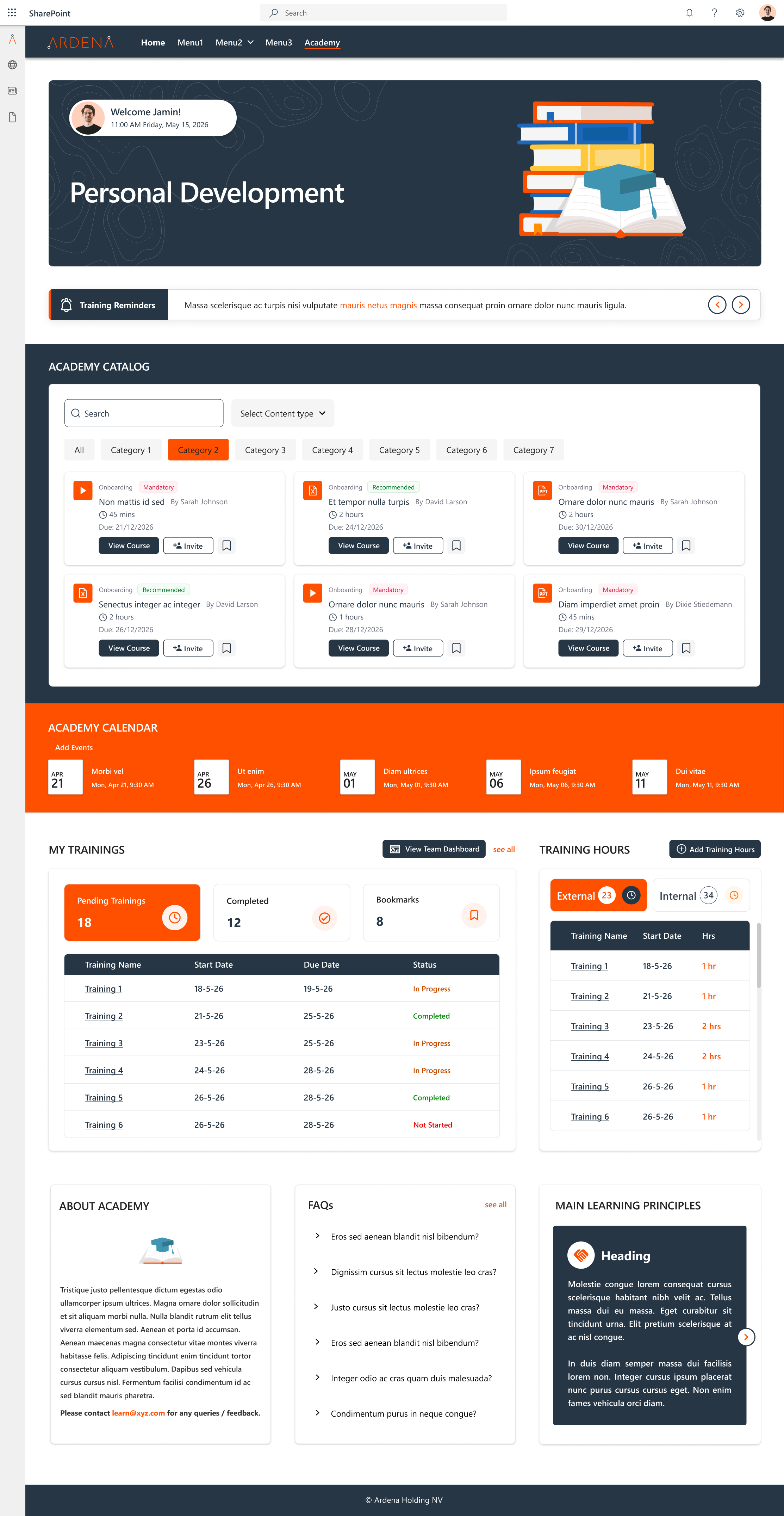
SharePoint Designs designed and delivered a custom Learning Management System fully embedded within Ardena’s existing SharePoint intranet. The solution was built entirely on native Microsoft technologies, with no third-party tools introduced.
Architecture Overview
The LMS lives within the Ardena intranet as a set of SPFx (SharePoint Framework) web parts deployed on dedicated learning pages. From the perspective of an Ardena employee, the learning platform is simply another section of the intranet they already use, accessible from the intranet navigation with no separate login, no new URL, and no unfamiliar interface.All training data course enrollments, completion records, assessment results, webinar attendance, and certificates are stored in structured SharePoint lists and libraries within Ardena’s own Microsoft 365 tenant. Data never leaves the organization’s environment.
Core Features Delivered
SharePoint-Embedded Course Catalog and Learner Interface
The course catalog is surfaced as an SPFx web part on the Learning section of the Ardena intranet. Employees browse available courses, view descriptions and prerequisites, self-enroll, and track their own progress all without leaving the intranet. Courses are structured as SharePoint pages with embedded Microsoft Stream videos, SharePoint-hosted documents, Microsoft Forms assessments, and completion acknowledgment buttons.
The learner’s personal training homepage shows their enrolled courses, completion status, upcoming deadlines for mandatory training, and earned certificates personalized using Microsoft Entra ID group membership, so each employee sees content relevant to their role and site.
Role-Based Training Dashboards for HR and Managers
HR administrators and people managers see a different view of the LMS from their role-specific intranet homepage. Power BI reports embedded directly on the management dashboard show:
- Enrollment and completion rates by course, department, and site•
- Mandatory training compliance status, who is current, who is approaching deadline, who is overdue, filterable by team, role, and location•
- New joiner onboarding training progress across all active new hires• Certification expiry tracking with 60/30/7-day countdown indicators•
- Audit-ready compliance reports exportable for regulatory inspection documentation
These dashboards update in real time as completion records are logged. HR no longer requests reports; they open the intranet homepage, and the data is up to date.
Automated Microsoft Teams Webinar Attendance Tracking
This was one of the highest-value deliverables in the engagement. The integration works as follows:When a Teams webinar is created and registered as a training event in the LMS course catalog, a Power Automate flow monitors it via the Microsoft Graph API.
When the webinar concludes, the flow automatically retrieves the full attendance report from Graph, matches attendees against the enrolled learner list using their Microsoft Entra ID, marks completion records for all attendees who meet the configured minimum attendance threshold, and logs the attendance record with a timestamp to the compliance tracking SharePoint list. Partially attending learners receive a Teams notification prompting them to complete any remaining course elements.
The result: a process that previously required 30–60 minutes of manual administrator work after every webinar now completes automatically within minutes of the session ending, with no human intervention.
Compliance and Audit-Ready Reporting
For a GxP-regulated organization, training records must be traceable, timestamped, and retrievable on demand.
The LMS compliance reporting module provides:
- Complete training completion history per employee with date, course version, assessment score (where applicable), and acknowledgment timestamp•
- Mandatory training register showing required courses by role and current compliance status across the workforce•
- Certificate generation for completed courses with automated expiry and renewal notification•
- Exportable audit packages covering specified date ranges, employee groups, or individual compliance records, formatted for regulatory inspection documentation
All compliance records are stored as immutable SharePoint list items. Access to modify historical records is restricted to administrators with full audit logging via Microsoft Purview.
Automated Enrollment and Notification Workflows
Power Automate manages the operational workflows that keep the LMS running without constant administrator attention:
- When a new employee is created in the HR system, their role and site metadata triggers automatic enrollment in the mandatory training courses for their position induction, GxP awareness, site safety, and role-specific modules with personalized Teams notifications directing them to the LMS
- Upcoming training deadlines trigger reminder notifications via Teams at 30 days, 14 days, and 3 days to the learner and their manager
- Course completions trigger certificate generation and update the compliance dashboard in real time
- Training content updates trigger notifications to all learners who have previously completed the course, prompting re-completion where required for the updated version
Implementation Approach
The project was delivered through an iterative methodology with regular stakeholder review points, ensuring alignment with Ardena’s existing intranet architecture and operational expectations at every stage.
Stage 1 - Discovery and Requirements (Weeks 1–2)
Structured workshops with HR, L&D, IT, QA, and departmental managers to map current training workflows, identify mandatory training requirements by role, document compliance reporting obligations, and define the precise data points required in HR and manager dashboards. Microsoft Graph API capabilities and Teams webinar data structures were assessed during this phase to confirm the automation approach before development began.
Stage 2 - Solution Design (Weeks 3–4)
SharePoint information architecture for the LMS was designed to integrate cleanly with Ardena’s existing hub and site structure. SPFx web part specifications were produced for the learner interface, course catalog, and management dashboard components. Power Automate workflow designs were documented for stakeholder review and sign-off before development started. The Teams webinar attendance automation was prototyped and validated against a live Ardena Teams environment.
Stage 3 - Iterative Development (Weeks 5–12)
Development was phased: learner interface and course catalog first, followed by enrollment and notification workflows, then the management dashboards, and finally the Teams webinar attendance automation. Each component was reviewed by nominated HR and IT stakeholders before the next phase began, enabling incremental feedback and reducing rework at the end.
Stage 4 - Compliance Reporting and Audit Configuration (Weeks 13–14)
The compliance reporting module was configured and validated against Ardena’s documented audit requirements. Microsoft Purview audit logging was configured for the LMS data environment. The export formats for audit packages were tested and signed off on by the QA team.
Stage 5 - Testing and Controlled Rollout (Weeks 15–16)
User acceptance testing with a nominated group of learners, managers, and HR administrators across multiple sites. Issues identified and resolved. Controlled rollout to the full employee base with a guided first-login experience and role-specific quick-reference guides.
Technology Stack
Every technology listed below was already included in Ardena’s Microsoft 365 licensing.
Additional third-party licensing cost: €0.
Client Perspective
“We had an LMS that worked technically. But it sat outside everything else we used. Our HR team couldn’t see training status without pulling a report. Every Teams webinar meant someone had to spend an hour manually updating attendance records. And we were paying for it every year, on top of a Microsoft 365 investment that should have delivered everything we needed. SharePoint Designs built something that actually fits our workflow. The attendance automation alone saved us more time in the first month than I expected. And having training status visible on the management dashboard rather than buried in a separate system changed how our managers engage with L&D compliance.”
- HR Operations Lead, Ardena
Key Lessons From This Project
- The “existing LMS” conversation is really a build-vs-buy decision. For organizations already on Microsoft 365 with a SharePoint intranet in place, the question is not “which LMS should we buy?” but “what would it cost to build exactly what we need versus continuing to pay for something that doesn’t quite fit?” For Ardena, the build option delivered better outcomes at lower long-term cost.
- Microsoft Graph unlocks automation that LMS vendors can’t match natively. The Teams webinar attendance integration was possible only because Microsoft Graph exposes Teams meeting data via API. No third-party LMS, including Microsoft-native products like LMS365, provides this level of seamless, automatic attendance capture for Teams webinars. Custom development on the Microsoft platform beat the product alternatives on this specific requirement.
- Embedding the LMS in the intranet is not cosmetic; it drives adoption. Learners who do not have to change context, navigate to a separate URL, or authenticate again are significantly more likely to complete training when prompted. The friction of switching to a separate platform is a genuine adoption barrier, particularly for staff in manufacturing or laboratory environments who access the intranet on shared workstations during shift transitions.
- Real-time dashboards change the HR behavior, not just the data. The shift from “request a report” to “look at the dashboard” changed how Ardena’s HR team and people managers engaged with training compliance. Managers who previously checked training status only when prompted by an HR reminder now proactively manage their team’s compliance because the information is visible on their intranet homepage every day.
- For GxP-regulated environments, building compliance reporting into the architecture from the start is non-negotiable. The audit-ready reporting module was not added at the end of the project it was specified in discovery, designed alongside the learner interface, and validated by QA before rollout. Retrofitting compliance reporting into an LMS after it is live is significantly harder and more expensive than designing for it from the beginning.
About SharePoint Designs
SharePoint Designs is a Microsoft-certified implementation partner specializing in custom SharePoint intranet solutions, Microsoft 365 workflow automation, and native LMS development for organizations across life sciences, healthcare, financial services, manufacturing, and professional services. We build on what you already own using SharePoint, Power Automate, Power Apps, Power BI, Microsoft Teams, and Microsoft Graph with no third-party add-ons required.
For life sciences organizations, we have specific expertise in GxP-aligned document governance, compliance reporting architecture, and pharmaceutical-grade audit trail configuration within Microsoft 365.
Schedule a free consultation →
Related reading:
%201.png)
About the Client
Kalsec (Kalamazoo Spice Extraction Company) is a privately held, U.S.-based leader in natural food ingredients. They specialize in developing and producing natural spice and herb extracts, colors, and antioxidants for the global food and beverage industry.
Challenges
Kalsec’s existing SharePoint intranet was built using standard, out-of-the-box (OOTB) web parts, which had several limitations:
- Low Employee Engagement: The platform lacked interactive and engaging content, reducing user participation.
- Overwhelming Quick Links and Limited Search: Too many quick links cluttered the interface, while the search functionality was insufficient for finding relevant information.
- Complex Navigation: Users found it difficult to navigate across the site, leading to a fragmented user experience.
- Lack of Branding and Personalization: The platform did not reflect Kalsec’s brand identity or support personalized content for employees.
Our Solution – Kalsec SharePoint Intranet Real Example
At SharePoint Designs, we partnered closely with Kalsec to transform their OOTB SharePoint into a modern, intuitive, and personalized intranet aligned with their business needs and brand identity. Our approach focused on improving usability, simplifying navigation, and enhancing content discoverability.
Before: Existing SharePoint Intranet (Challenges)
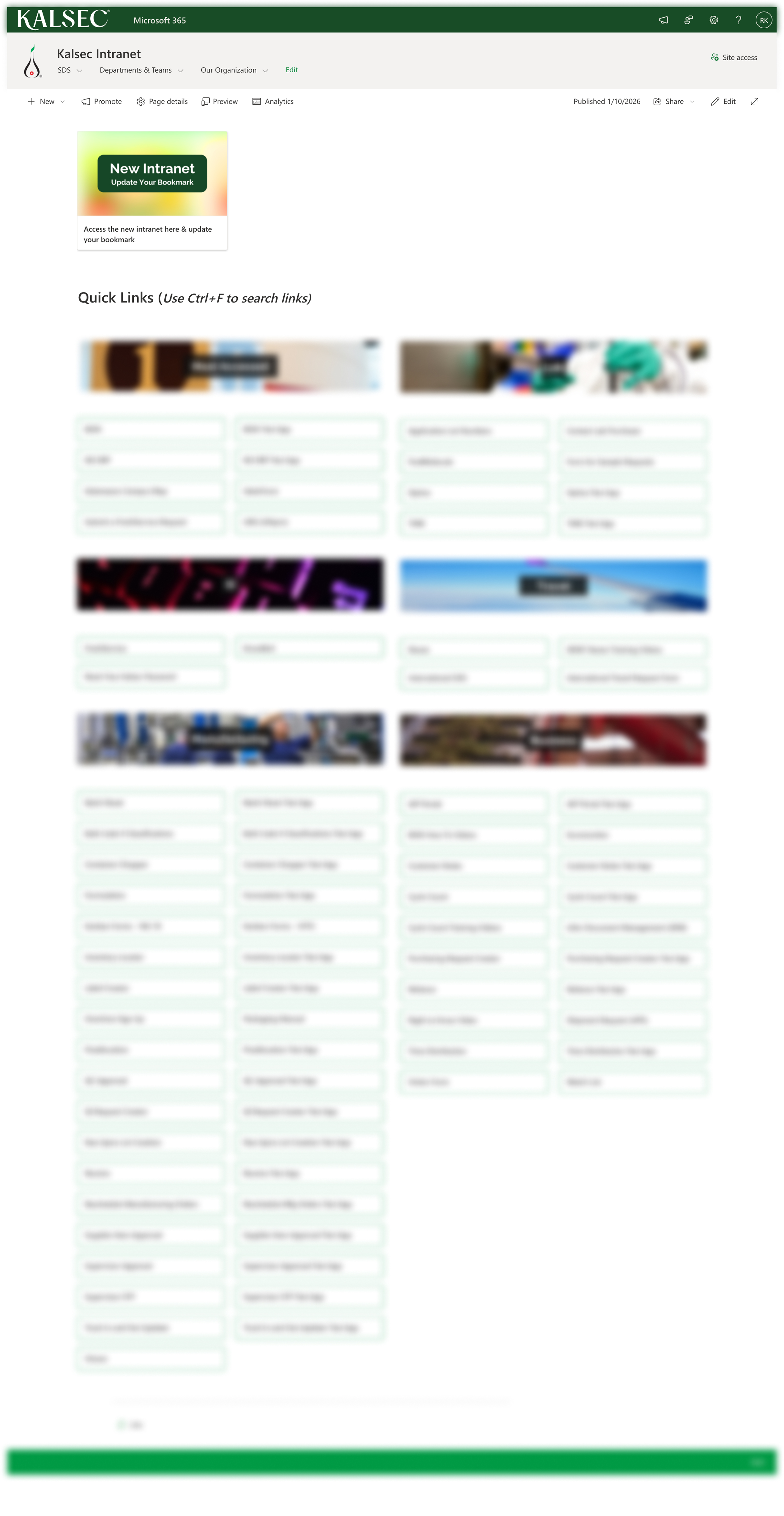
The existing intranet was built using standard OOTB SharePoint components, resulting in a cluttered and overwhelming user experience.
Key Challenges:
- Excessive quick links with no prioritization
- Poor navigation across tools and departments
- Limited search functionality for content discovery
- No personalization or brand alignment
This made it difficult for employees to quickly find information and complete tasks efficiently.
After: Redesigned Modern Intranet Experience
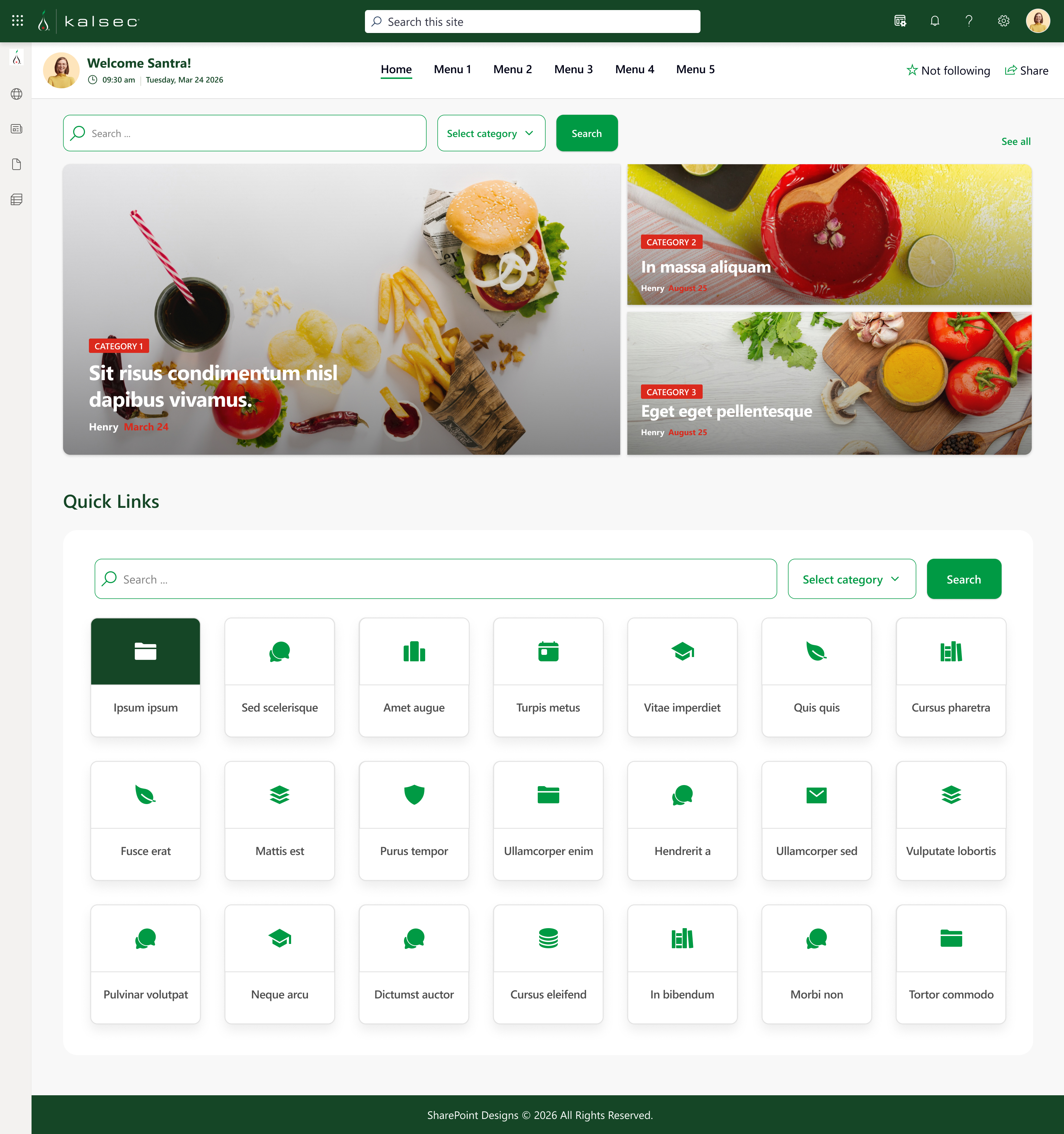
Key Enhancements:
- Smart Quick Links with Search & Categorization
Users can search, filter, and access links based on relevance and department - Personalized Homepage Experience
Welcome banner, dynamic content, and improved search for faster access - Simplified Navigation Structure
Clear top navigation for seamless movement across the intranet - Modern, Brand-Aligned UI
Clean design reflecting Kalsec’s identity and improving engagement
Before vs After Impact
- Faster access to information: Reduced time to find content by ~40%, enabling quicker task completion
- Reduced clutter and confusion: Structured quick links improved usability and reduced unnecessary navigation
- Improved employee engagement: A modern, visually appealing interface increased interaction.
- Better navigation experience: Simplified menus helped users access key tools 2x faster
Benefits
The newly designed intranet offers:
- Enhanced Search Functionality: Efficient content discovery with personalized filtering and search capabilities.
- Improved User Engagement: Lively, organized pages with relevant, up-to-date content to keep employees informed and engaged.
- Personalized User Experience: Tailored quick links and content based on user roles, improving productivity and satisfaction.
- Streamlined Communication: A visually appealing and brand-aligned digital workspace that fosters a connected and informed workforce.

Client: Compass Group Denmark A/S
HQ: Albertslund, Denmark
Industry: Contract Food Services, Facility Management, Cleanin
Platform: SharePoint Online (Microsoft 365)
Company Overview
About Compass Group Denmark
Compass Group Denmark A/S is Denmark's leading provider of canteen, catering, facility management, and cleaning services. A subsidiary of Compass Group PLC, one of the world's largest foodservice companies, the Danish operation has built its own identity grounded in Danish quality traditions, sustainability, and service excellence since its founding in 1973.
Operating nationwide, Compass Group Denmark runs approximately 350 canteens and employs around 3,000 people across the country. The company operates under three distinct service brands:
- Food & Co - daily meal experiences in staff restaurants for private and public sector organizations and universities across Denmark
- Eurest Facility Services - facility management, cleaning, and workplace services for large Danish companies and public institutions
- ESS - offshore catering and support services for workers on North Sea platforms in Danish waters
Together, these brands serve over 100,000 guests every day in Denmark. The breadth of operations from university canteens in Aarhus to offshore platforms in the North Sea means that operational knowledge, food safety compliance, and service standards must be consistently communicated to a geographically dispersed, Danish-speaking frontline workforce.
The Challenge: Knowledge Management for a Dispersed Danish Workforce
Why this is harder than it looks
Unlike a corporate office workforce that sits at a desk with daily access to a computer, Compass Group Denmark’s operational employees are kitchen staff, cleaning teams, facility managers, offshore service workers are mobile, site-based, and not always online. Communicating SOPs, safety procedures, and compliance policies to this workforce reliably and verifiably is a genuine operational challenge.
Adding complexity: Compass Group Denmark’s workforce is predominantly Danish-speaking. Documentation prepared in English, whether from the global Compass Group PLC or from central Danish management created a real accessibility gap for frontline staff who needed guidance in their own language.
The industry-wide knowledge management problem
The challenge Compass Group Denmark faced reflects a well-documented industry-wide issue:
For a food services organisation operating across 350 sites with strict food safety and compliance obligations, this is not an abstract efficiency problem. Every hour a site manager spends searching for an outdated SOP, every compliance gap caused by inaccessible guidance, every food safety incident traceable to a misunderstood procedure these are direct operational and regulatory risks.
The five specific problems SharePoint Designs was brought in to solve
1. Dispersed documentation with no single source of truth
Critical SOPs, food safety procedures, operational policies, and site-specific guides were scattered across multiple folders, email threads, and local storage. There was no guarantee that the document a site manager was reading was the current approved version , a serious risk in an environment where outdated food safety guidance can have direct consequences.
2. No intelligent search or structured categorisation
The existing setup provided basic folder navigation at best. Employees across different departments and operational roles had to know where to look before they could find anything. With staff operating across kitchen, cleaning, facility management, and offshore contexts, this was unworkable.
3. No bilingual capability for Danish-speaking frontline staff
This was the most acute pain point. Compass Group Denmark’s operational workforce is Danish-speaking. English-only documentation left frontline staff without reliable access to localised procedures, and there was no system to keep Danish and English document versions synchronised when updates were made.
4. No formal governance or approval workflow
Documents could be uploaded and effectively published to the entire workforce without any formal review. There was no structured author → approver → publish chain to ensure accuracy and compliance before content reached operational teams.
5. No way to validate that employees had understood critical documents
For food safety SOPs and compliance-critical procedures, there was no mechanism to confirm that staff had not only accessed a document but actually understood it. In a compliance audit context, this gap is significant.
The Solution: A SharePoint Knowledge Base Built for Denmark
SharePoint Designs designed and implemented a centralised Knowledge Base platform on SharePoint Online, built specifically around Compass Group Denmark’s operational structure, Danish language requirements, and food safety compliance obligations.
1. Multi-type article management
The platform supports structured uploads for every document type Compass Group Danmark manages, with predefined metadata enforced at the point of upload:
- Standard Operating Procedures (SOPs)
- Food safety and compliance guides
- Operational policies
- Frequently Asked Questions
- Process checklists and lists
- General knowledge articles and how-to guides
Each article type carries its own mandatory metadata: article type, department, applicable sites, language version, document status, and approval state. This classification happens at upload not retrospectively so every document enters the system correctly tagged from day one.
2. Structured categorisation for 350 canteens and three service brands
A flexible categorisation framework organises all content by department, document type, service brand (Food & Co, Eurest Facility Services, ESS), and operational area. The structure accommodates Compass Group Denmark’s operational diversity without forcing a single taxonomy onto three operationally distinct brands.
The categorisation model is designed to scale new sites, new document categories, and new service areas can be added without restructuring the existing framework. This is foundational: without clean, consistent categorisation, search returns noise. With it, a Food & Co kitchen manager in Copenhagen and an ESS offshore catering supervisor find the right document first time.
3. Bilingual Knowledge Base: Danish and English, structurally synchronised
This was the defining feature of the solution for Compass Group Denmark. The bilingual architecture was not a translation toggle, it was built as a structural document management principle.
- Authors create a document in one language as the primary version
- A linked translation is created and attached to the original as a language pair
- Version tracking maintains alignment: when the primary version is updated, the linked translation is surfaced for corresponding review
- Search results automatically prioritise Danish-language documents for Danish-speaking users
For Compass Group Denmark’s frontline workforce, this means: a kitchen team member searching for a food safety SOP finds the Danish-language version first, without needing to know whether an English original exists. The platform removes the language barrier structurally, not through manual translation management.
Why this matters in a Danish compliance context: Danish food safety regulations and workplace documentation requirements expect that operational guidance is accessible to employees in a language they understand. A bilingual Knowledge Base with Danish-priority search directly supports this obligation.
4. Advanced search with Danish-language prioritisation
A dedicated search interface was built with layered filtering:
- Keyword search - full-text search across all articles
- Article type filter - narrow to SOPs, policies, FAQs, guides, or checklists
- Department filter - scoped to the user’s operational area
- Category filter - by service brand or operational domain
- Language filter - Danish-language documents surfaced by default for Danish users
The Danish-language prioritisation is baked into the search algorithm, not a user-controlled setting. A frontline employee does not need to select a language preference the system defaults to the language that is most relevant for them.
5. Dynamic homepage tuned for operational relevance
The Knowledge Base homepage dynamically surfaces:
- Recent articles - newest additions and updates, ensuring critical revisions are immediately visible
- Featured articles - content manually promoted by administrators for high-priority compliance periods
- Suggested content - personalised recommendations based on department and role
For a company managing 350 sites across diverse operational contexts, role-relevant content surfacing at the homepage level is the difference between a platform employees use and one they ignore.
6. Auto-generated document assessments
This is the feature that closes the gap between document publication and verified comprehension, the capability that most directly addresses compliance risk in a food safety environment.
When uploading a compliance-critical document, authors can enable an assessment requirement. The platform automatically generates questions and answers from the document content. Once an employee reads the document, they complete the auto-generated assessment. The result is:
- Automated pass/fail tracking at the individual employee level
- An auditable record that specific staff have read and understood specific documents
- No manual question-writing required from authors, the system generates assessments from the document itself
- No separate LMS or external compliance system required
In the Danish food safety context: Compass Group Denmark can now demonstrate, with a full audit trail, that a named employee at a named site has read and understood a specific food safety SOP on a specific date. This is the kind of verifiable compliance record that supports both internal governance and external audit requirements.
7. Configurable approval workflow with full audit trail
Every document goes through a structured governance chain before publication:
- Author uploads the document and selects an approver
- Approver receives notification and reviews the document for accuracy and compliance
- Approver either publishes the document or returns it to the author with comments
- Only approved content reaches the Knowledge Base
- Every approval action is logged against the document, creating a governance audit trail
This eliminates the previous situation where any user with folder access could effectively publish operational guidance to 3,000 employees without a review gate. Every document in the Knowledge Base now has a named author, a named approver, and a timestamp.
Client Overview
Industry: Healthcare (Fertility & Reproductive Care)
Founded: 1985
Location: Harley Street, London
Coverage: 13 clinics across South East, North East, West of England, and Wales
Established in 1985 on Harley Street, London Women’s Clinic (LWC) has pioneered many of the fertility treatment techniques widely used today. With state-of-the-art laboratories, theatres, and over 35 years of consultant expertise, LWC is a recognized name in UK fertility care.
As the organization expanded geographically, they needed a modern SharePoint intranet that reflected their brand, supported multi-location teams, and improved employee engagement.
The Business Challenge
LWC initially partnered with SharePoint Designs in early 2022 for a fully custom intranet, which was completed on time. However, due to internal circumstances, the intranet was never launched.
In late 2025, LWC re-engaged with a new requirement:
- A ready-to-install SharePoint intranet template
- Go-live within one month
- Custom webparts integrated seamlessly
- Easy maintenance (single intranet owner)
- Updated branding aligned with their latest identity
- Fully mobile-responsive experience
Key Challenges
- Deploying a template-based intranet with custom experience
- Integrating an interactive facilities webpart (clinic map)
- Ensuring scalability with reusable webparts
- Balancing speed of deployment with customization depth
- Designing for non-technical maintenance
This required a hybrid approach template efficiency with custom flexibility.
Our Structured Deployment Approach
To ensure fast and controlled rollout, we followed a structured SharePoint intranet implementation framework:
- Requirement validation and environment readiness
- Stakeholder kickoff alignment
- Secure environment setup and configuration
- Template deployment (staging/production)
- Branding and role-based customization
- Functional validation and performance testing
- Client walkthrough and sign-off
- Live deployment
- Documentation, training, and support handover
This structured methodology ensured a smooth one-month launch timeline.
The SharePoint Intranet Solution
The final solution combined a ready-to-install SharePoint intranet template with tailored enhancements.
- Custom branding & themes: SharePoint intranet infused with LWC’s latest brand colors and dynamic theme.
- Interactive homepage: Featuring vision, mission, values, quick links, employee spotlights, Quote of the month and Message from their MD.
- Interactive facilities webpart: An interactive map with their facilities(clinics) pinned, upon hovering list the details related to that particular location.
- Reusable page templates: Ensures scaling up to multiple pages as and when needed.
- Reusable webparts: Repurposing several webparts to serve multiple functions.
- Interactive custom webparts: Adding interactivity and modern appeal.
- Mobile-responsive design: Seamless access across desktops, tablets, and smartphones.
Measurable Results & Business Impact
The transformation delivered measurable performance improvements:
- 80% increase in intranet traffic
- Significant improvement in internal navigation efficiency
- Higher employee engagement across clinics
- Positive staff feedback on usability and branding
- Reduced dependency on technical resources (single admin model)
The intranet evolved from an information repository into a year-round engagement hub.
Why This Healthcare Intranet Implementation Matters?
This case demonstrates how a ready-to-install SharePoint intranet template can:
- Strengthen internal brand alignment
- Improve multi-location communication
- Enhance employee digital experience
- Drive measurable adoption
- Balance speed, scalability, and maintainability
For healthcare organizations operating across multiple clinics, the combination of structured deployment + reusable components + interactive features create long-term sustainability.
Looking to Launch a Modern SharePoint Intranet?
We specialize in:
- Ready-to-install SharePoint intranet templates
- Fully custom SharePoint intranet design
- Power Apps integration
- Custom webparts
- Employee engagement solutions
Schedule a free consultation and reimagine your digital workplace experience.

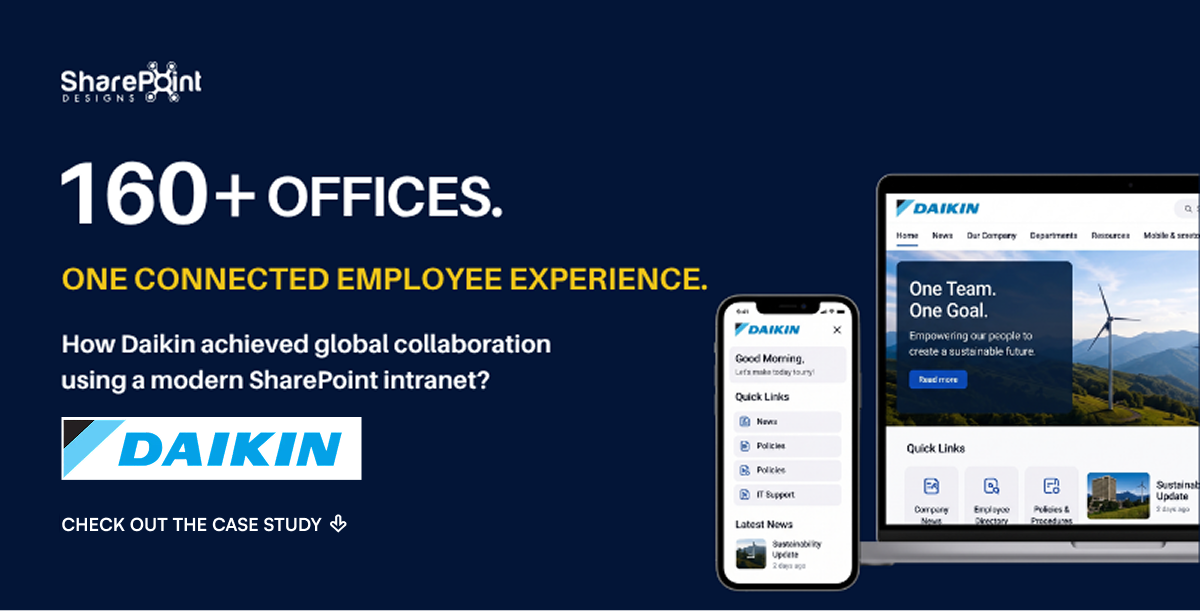
Connecting 30+ Countries Through a Unified Digital Workplace
When a global enterprise like Daikin operates across continents, connecting people, content, and communication becomes a major challenge.
To bridge the gap between 160+ global offices, Daikin needed a solution that simplified collaboration, enhanced accessibility, and built a shared culture.
The answer was a modern SharePoint intranet a platform that transformed fragmented systems into a unified global digital workplace.
Client Background
Renewal by Andersen (RBA) is the window replacement subsidiary of Andersen Corporation, a company that has been revolutionizing the window and door industry for more than 110 years. With a commitment to quality, innovation, and customer satisfaction, RBA needed an intranet that reflected its legacy while meeting modern workforce needs.
The Challenge
RBA wanted a custom-designed intranet that felt modern, vibrant, and highly visual. Their existing intranet lacked design appeal, wasn’t mobile-friendly, and failed to engage employees.
Additionally, the team envisioned festive branding themes for Halloween, Christmas, New Year, and Easter. This introduced a new design challenge creating highly visual seasonal experiences without distracting from the main homepage content.
Key challenges included:
- Outdated intranet design lacking user engagement.
- No mobile-friendly access for employees on the go.
- Need for festive seasonal branding integrated seamlessly.
- Balancing design richness with usability and focus.
Our Approach
We adopted a design-first strategy that prioritized both aesthetics and functionality. Our process included:
- Custom layouts, icon sets, and branded elements tailored to RBA’s corporate identity.
- Close collaboration with internal teams to plan seasonal design rollouts.
- Creative direction through wireframes, mood boards, and style guides aligned to Andersen’s brand.
- All visuals and design assets were originally created by our in-house design team specifically for RBA’s intranet.
The Solution
The result was a visually rich, interactive SharePoint intranet designed to boost engagement and usability:
- Custom branding & themes: SharePoint intranet infused with RBA’s brand colors and dynamic themes.
- Interactive homepage: Featuring quick links, news highlights, and event countdowns.
- Festive seasonal branding: Holiday-themed banners, greetings, and background visuals for major celebrations.
- Reusable design templates: Ensuring future seasonal updates are fast and effortless.
- Animated custom webparts: Adding interactivity and modern appeal.
- Mobile-responsive design: Seamless access across desktops, tablets, and smartphones.
The Results
The transformation delivered measurable business impact:
- Employee engagement soared staff praised the appealing, functional, and festive intranet design.
- Holiday intranet traffic increased by 80%, driven by seasonal themes and interactive features.
- Navigation and usability improved, making it easier for employees to find information quickly.
- The intranet became a year-round engagement hub, strengthening employees’ connection to the RBA brand.
Why It Matters
This project highlights how a well-designed SharePoint intranet can do more than just share information it can:
- Strengthen brand culture.
- Enhance employee experience.
- Drive consistent engagement throughout the year.
Looking to build a modern, engaging intranet like RBA?
Our team specializes in SharePoint intranet design, Power Apps integration, and custom employee engagement solutions.
Schedule a Free Consultation and reimagine your workplace experience.

About our client:
AVA Care one of our prestigious clients, is a manufacturer of Ayurvedic and herbal personal care products. The company's flagship brand, Medimix, is renowned as the world's largest-selling Ayurvedic handmade soap. Other brands of this company include Sanjeevanam, Kaytra, and Melam.
AVA Care is a forward-thinking organization with a strong focus on compliance and training, aimed to streamline and digitize their Standard Operating Procedure (SOP) management process. Their goal was to move away from static, attachment-based SOP documents toward a dynamic, user-centric experience that fosters clarity, accountability, and continuous learning.
Challenges
The legacy SOP management approach relied heavily on document libraries/ folders and template attachments, making version control, user engagement, approvals and training validation difficult to manage at scale. Additionally, the organization wanted to align SOP publication with a structured approval process and automated training assignments based on review frequencies, something that the existing system couldn't support effectively.
Solution
At SharePoint Designs, we implemented a custom SOP Manager within Microsoft SharePoint, reimagining the entire SOP lifecycle with a focus on accessibility, governance, and learning enablement. The following key components were delivered:
1. SOP as Interactive Site Pages
Instead of uploading static documents, SOPs were created as structured SharePoint site pages, mirroring the organization’s SOP format. This allowed SOPs to be:
- Easily searchable and readable
- Integrated with version history and audit trails
- Equipped with features like Print, download, and Permissions Management based on user roles
2. Document Management & Approval Workflow
A custom Power Automate workflow was designed to handle:
- Multi-stage approval before publication
- Version control with status indicators (Draft, Awaiting Approval, Published)
- Notifications to stakeholders throughout the review process
About Our Client
Giddings MacEachern is one of the leading legal service providers in Canada. They serve customers throughout British Columbia, Smithers, Houston, and Kitimat - providing legal services across Business Law, Family Law, Criminal Law, Real Estate, and Wills.
Project Challenges
- Hundreds of worker hours required for preparing legal documents that support critical legal processes
- Law firms generate tons of legal documents every single day and most of the legal documents are created and updated manually
- A considerable amount of time spent by legal assistants & legal professionals to fill in details and share the document with customers
- High chances of errors due to the manual documentation process that requires complete rework -leading to significant resource wastage
- Corporate legal departments are responsible for providing legal support and advice to organizations and their employees. They handle a wide range of legal matters, such as contract drafting and review, intellectual property, labor and employment law, litigation, and compliance with regulatory requirements. Corporate legal departments often have large volumes of legal documents, communications, and tasks to manage, which makes legal matter management a crucial function.
Our Solution
During the project's exploratory stage, SharePoint Designs identified the common fields in the legal documents. Using MS SharePoint Forms, we designed a simpler form to capture all the fields that were to be filled in the document - thereby reducing repetition of work. Post the form submission - the documents were generated and automatically saved in a unique folder.
By using SharePoint as a legal matter management tool, corporate legal departments can improve their efficiency and effectiveness. SharePoint's document management capabilities allow legal teams to store, organize, and easily access legal documents and information. SharePoint's workflow and automation features enable legal teams to automate processes such as document routing, approvals, and reminders, which in turn helps to reduce errors and increase productivity. Additionally, SharePoint's collaboration tools enable legal teams to communicate and collaborate effectively, which is essential for managing legal matters.
Thanks to our MS SharePoint expertise, the client could quickly retrieve the right document at the right time while easily reviewing the updated fields highlighted.
Business Benefits
- Improved efficiency and productivity: SharePoint's workflow and automation features enable legal teams to automate repetitive tasks, such as document routing, approvals, and reminders, Vast reduction of legal professional hours involved in updating, correcting, and verifying the documents
- Increased data accuracy and security: SharePoint's document management capabilities allow legal teams to store, organize, and easily access legal documents, reducing the risk of errors and ensuring the security of sensitive information.
- Enhanced collaboration and communication: SharePoint's collaboration tools enable legal teams to communicate and collaborate effectively, allowing them to work together more efficiently on legal matters.
- Improved retention and retrieval since documents were electronically saved.
- Cost savings: By automating legal matter management processes and reducing the need for manual tasks, SharePoint can help legal departments to save on labor costs. More data accuracy by automating a huge chunk of the document generation process.
- Better compliance and risk management: SharePoint's compliance and security features enable legal teams to track the progress of legal matters and ensure compliance with legal and regulatory requirements.
Read More

About Our Client
Damage Prevention Solutions, LLC is a leading manufacturer of damage prevention systems for underground utilities, based in the US. Their state-of-the-art solutions include tracer wire delivery systems, integrated marking tapes, and barricade tapes.
Project Challenges
- Lack of an intranet setup with even basic features
- Poor transparency to showcase information about important tasks
- No skilled resources to work with Microsoft SharePoint, Graph, and PowerShell
Our Solution
Powered by SharePoint Modern Intranet and custom out-of-box features, SharePoint Designs built a fully equipped intranet portal for the client. It came with quick links that directed users to newsfeeds, announcements, critical business processes, and organizational policies, and photo galleries. We also used the Curator software to meet their unique requirement of displaying live feeds posted by clients in the LinkedIn Professional network community.
With MSGraph API, we integrated shared calendars into the intranet so that it can display the assigned tasks on any particular day/ week/ month. Additionally, we also set custom themes using PowerShell to align the intranet look-and-feel with the client’s branding.
Business Benefits
- Unified view into crucial organizational information
- Smarter resource planning and transparency of assigned tasks with integrated calendars
- Social media insights of clients based on LinkedIn live feeds

About Our Client
Lebara is a UK-based telecommunications company that helps global customers make calls at affordable rates. Powered by the best-tested 4G network from KPN, they offer extremely affordable pay-as-you-go and contract-based mobile SIM cards.
Project Challenges
- Siloed organizational communication touchpoints that limited the effectiveness and the reach of messaging
- Lack of a single interface to inform the employees about key announcements, up coming events, birthdays/anniversaries of colleagues, and more
- No skilled resource to create an intranet using available technology (Classic SharePoint)
Our Solution
With deep Microsoft SharePoint expertise, SharePoint Designs harnessed the classic intranet model to design a lively and interactive intranet portal. We helped the client provide basic information such as policies, corporate calendars, and e-learning opportunities based on user needs. We also created sub-pages to view organizational information, newsfeeds, and more. Our customized solutions included announcements, birthdays/anniversaries, photo galleries, employee blogs, quick polls, etc.
The intranet also came equipped with a translation feature to help employees access content in their preferred language. Furthermore, the country-specific pages only showed relevant content based on the employee’s preference
Business Benefits
- One-stop search option for employees to get timely updates
- Increased user adoption, thanks to the high level of customization
- Improved employee engagement through unified and proactive organizational communication

Lebara is a British telecommunications company providing services in many countries around the world, using the mobile virtual network operator business model. Lebara Mobile provides pay-as-you-go and contract based mobile SIM cards.
Client Requirement
Our Client required a simple intranet which will serve as internal communication channel to keep the employees updated with internal announcements, upcoming events, news feeds, employee birthday / anniversaries and many other similar features.
Our Solution
Using Classic Intranet model, we designed a lively and colourful intranet with the below features.
Quick Links for the employees to access
- Policies & Procedures
- Corporate Calendar
- Business Process
- E-Learning
- Outlook & Teams
- People related information.
Customized solutions to include,
- Announcements
- Birthdays & Anniversaries
- Photo Gallery
- Employee Blogs
- Quick Polls
- Employee Spotlight
The Intranet also provides,
- Brief about Company
- News Feeds
- Countries page to show relevant content based on employee country selection
- Translation Feature – Incorporated the Translation feature to translate site content to six different languages.
Benefits
The Intranet will be a one stop search option for employees to get any updates from the organisation.
The site is very interactive and allows the employee to choose the information they want to see.

Damage Prevention Solutions is an innovative manufacturer of excavation damage prevention & location systems for underground utilities.
"Manufacturer of Signaltape Damage Prevention & Marking System. Signaltape® is a simple, inexpensive, damage prevention and marking system for buried utilities and infrastructure. Signaltape® provides a visual warning directly to the excavation equipment operator, where traditional marker tapes shear underground without providing an adequate warning."

Advance Electric is a fast growing Electrical Contractor company serving the Santa Barbara area, including Montecito and Goleta. They provide innovative electrical solutions and application through quality materials and superior craftsmanship.
Business Case
Client required an end to end application to track, manage and fix the payroll system of the employees. The application should capture the commuting time and the actual work hours by the employee to fix the issue or install an electric item in their respective customers location.
How we helped?
We developed a single page SharePoint application to manage time-sheets and associated costs . The application will capture the number of hours taken to resolve the issue or install an electrical item by the employee in the respective customers workplace. The details are filled by the employee using a tablet provided by the company. The entered information is consolidated in the cloud storage of office 365 which can be accessed by the administration team. The admin team will approve the data and the payroll of the employees.
Technologies Used
The solution is developed using SharePoint design manager, Bootstrap, JavaScript Client object model. We have also implemented custom UI, navigation and branding.

Manhattan TechSupport.com provides IT services to businesses in New York City and New York metro area. They specialize in network engineering, technical support, security and most importantly customer service.
Business Case
MTS required a client management solution, they wanted a way to deal with Clients, their projects, IT Infrastructure and other information relating to a client. Since they multiple clients, they needed a unique way to Create, Update and Manage each client.
How we helped?
We developed a dashboard for creating client specific portals to each client with different components which includes documents management, contacts management, discussion boards and infrastructure management. Each component is protected with access rights to enable privacy within the organization thereby ensuring the right information is available to the right person at the right time.
Technologies Used
The solution is developed using SharePoint design manager, Bootstrap, JavaScript Client object model. We have also implemented custom UI, navigation and branding.

One evening we had an interaction with the CEO of Gateway groups Kurus Elavia, who wanted an intranet site for the employees of his company. He wanted it to be fun filled and the employees should enjoy using the internal site.
When we decided to agree for his requirement we explored about Gateway One. They provide a reliable and unparalleled experience in the security and frontline services for their clients. Their formula of superior executive-level client service and expertly trained personnel has been proven in some of the busiest, most challenging cities and travel hubs in the united states.
We at SharePoint Designs, arranged for a few meetings and brainstorming sessions with the Management team to have a detailed understanding about their requirement. We had meetings within our team to discuss about the feasibility and availability of the resources and organized a team to proceed with the project.
We developed a fun-based home page, which includes all the requested features like Quick Links where they can have contacts, lists, search and share options. Our intranet allowed the employees to share their popular stories, resources. News and events can be announced. Employees will also be able to share their achievement, celebrations, testimonials and customer feedback. The site will allow them to update customer stories as well.
They wanted a Task Management board which is a status indicator, which would help them to track the status of all the tasks which is performed under each project and every department with time frame to improve the performance of the employees. They wanted it to be extremely simple and easy to understand.
We created a portal where they can enter the tasks that they are performing under each project and department with time slot. They gave us the description of their process which they followed, using this we divided the process into four divisions that are Finance and Accounting, Human Resource, Legal and security. Under each division they can add the project they are working on with the due date and the owner of the project. We gave colors for every status, like Green Indicates-Completed, Yellow Indicates-In progress and Red Indicates-Delayed. We gave them symbols to tag tasks that needs high importance and high importance with priority.
Gateway one provides services for Aviation industry and Security services in the United States. So, they wanted us to give them a dashboard which will help them to update all the information of operations regarding Aviation and Security. Let us discuss Aviation for more detailed understanding. Aviation dashboard includes ADA Complaints, Air lines, Aviation goal submit form, Aviation report form.
Client followed a goal setting system for their employees, hence we created an Aviation goal setting form where they can enter all the goals set by the company for the employees to achieve. An aviation report dashboard was built for the employees to update all the information like Scheduled hours, Safety incidents, baggage carts, either full time or part time employee, total number of employees under each Airline that they work for. The company will be able to track the performance of the employees based on the details entered in the report form. Employees will also be able to update the difficulties they face like administrative issues etc. We also created a dashboard for ADA complaints, where they can update if have any complaints.
We gave the client a similar dashboard for security services, which includes security complaints, Security Goals submit form, security report form and security sites.
They wanted a solution to deal with the employee enrollment system in the company and mainly wanted to reduce the paper work in the process. They also wanted a database where the information regarding the man power of the employees can be updated. They wanted some automated forms where they can update information on number of positions that are vacant and number of employees to be appointed in every process and department.
We created a form wherein they can enter the details about the job title, department, requirement date, hiring manager and employee’s status. We made it editable as well as viewable. If a manager needs requirement in his project or department he should give detailed information and the reason for the requirement, hence we created a form where he can enter all the information regarding the position, department, either full time or part time employee and the details of the hiring manger as well. This form will help them by saving their time and paper work.

The Trustees of Reservations is a non-profit land conservation and historic preservation organization dedicated to preserving natural and historical places in the Commonwealth of Massachusetts.
They are a group of more than 100,000 people who love the outdoors, who love the distinctive charms of New England, and who believe in celebrating and protecting them, for everyone, forever.
Together with their neighbours, they protect the distinct character of their communities and inspire a commitment to their special places. Their passion is to share with everyone the irreplaceable natural and cultural treasures we care for.
Business Case
Client wanted a custom intranet portal to share and connect internally to update important information across the departments. In addition they also wanted to keep track of day to day events, internal communications and rewards & recognition of the employees.
How we helped?
We have developed a custom branded Intranet that provides the employees with sections for Companywide announcements, quick links section, events calendar that consolidates important company events, various department pages that has document management, individual calendar and image galleries.
We have created an announcement list would be useful to keep the workforce informed about the current projects, department news and company announcements.
We have also made sure every staff is able to access the website from their smartphones or tablets. We have integrated Yammer to interact within the organization
We also have a specific link called 'How do I?' which has a dropdown section where we get detailed information steps on the process. Additionally, we have added a page which is 'View All', this page will help to view all the important updates and upcoming events of the company.
Technologies Used
The solution is developed using SharePoint design manager, Bootstrap, JavaScript Client object model. We have also implemented custom UI, navigation and branding.

For more than 100 years, Bigge has been one of America’s premier global crane sales, crane rental, and project services companies. Their innovative specialized project teams have also provided heavy lift, heavy rigging, specialized transportation equipment, and innovative engineering solutions for some of the most challenging projects across the US.
Business Case
Bigge wanted to revamp their existing SharePoint to work with cross-functional team and to be able to manage documents, contact lists, infrastructure management, announcement list and quick lists.
They also wanted to incorporate their custom templates provided by their Marketing and HR teams.
How we helped?
We created a custom intranet portal using SharePoint to develop features like document management, infrastructure management, contact list, event calendar to update various company events, personal calendar for employees, image galleries, quick link sections and announcements. We have also ensured that the employees are able to access intranet from their smartphones and tablets.
Using share point we have also developed a section for market place. It acts as their own market bazaar for buying and selling items and raise funds for good cause such as charity. We have seamlessly integrated Yammer to share, like, comment and post to their intranet contacts.
We have also developed document management section which will help the employees to access important internal documents related to the company. They can also view and manage forms, memos, policies and manuals. We have enabled cloud storage for retrieving documents from different locations.
We have inlcuded a specific link called 'How do I?' which has a dropdown section where we get detailed information and steps on the processes. Additionally, we have added a page which is 'View All', this page will help to view all the important updates and upcoming events of the company.
Technology Used
This solution is developed using SharePoint design manager, Bootstrap, JavaScript Client object model, Custom navigation and branding.

Dell Team in Europe is having vast clients across Europe and Middle East. All these clients rent or loan Dell products for their computing requirements. They are doing it through a Loan/rent requirement hardcopy form.
How we helped?
We understood the requirements from the client through various meeting and brainstorming sessions and clearly understood the pain areas. Coordinated and worked with different departments. What we understood was all the workings are manual and data is maintained using excel. Since, the system cannot be accessible from multiple client locations.
Solution Highlights
- We understood how they can go forward with the requirements. They suggested us that they have SharePoint that was adopted for file sharing and document sharing maybe we can use that tool to develop the system. So, we started working with the IT Department. Dell IT team to get required resources and tools to login and work in their SharePoint environment.
- We started putting together several databases and forms that are available over SharePoint and each forms are used to update the databases. We have also integrated an Access database that can input the data from Excel into the Access and this in turn provide data to SharePoint.
- We have designed Loan request form that queries different tables to get values and inventory. Then, Upon completing all the required fields. The form can be submitted. This form is designed using the Infopath Designer with several links to data sources and web services.
- SharePoint designer workflow is used to perform several process and approvals throughout the lifecycle of the Loan request from the Clients submitting the loan request to ultimately going thorough approvals and booking the equipment’s for client dispatch.
Technologies Used
This solution is developed using Infopath form, Java script Client object model, SharePoint designer workflows and other complex webservice lookup to different databases.

InterBarge is a provider of fluvial transportation and logistics services offering safe and efficient operations along South America’s Hidrovia Paraná Paraguay Waterway System. InterBarge owns and operates a modern fleet of inland river equipment primarily focused in moving dry bulk commodities for some of the largest companies in the region. With a strong operational background and personalized customer service, InterBarge is able to deliver integral logistics solutions to its clients.
InterBarge is owned by Seacor
SEACOR is a global provider of equipment and services primarily supporting the marine transportation and offshore oil and gas industries. It operates approx. 1,500 barges on the U.S. Inland River Waterways, the Gulf Intracoastal Waterways and the Magdalena River in Colombia.
Business Case
InterBarge had a challenge in understanding the performance of various departments such as fleet management, operations management, procurements and HR. They required a dedicated system developed using the SharePoint and establish coordination between various departments for continuous flow of process and performance of the fleet.
How we helped?
We understood the requirements from the client through various meeting and brainstorming sessions and clearly understood the pain areas. Coordinated and worked with different departments. We understood that there were lot of manual activities and data is maintained using excel, word and other files stored in the hard disk. There were no dedicated tools or softwares available for their use or for reporting.
Solution Highlights
- We understood how they can go forward with the requirements. They suggested us that they have SharePoint that was adopted for file sharing and document sharing may be we use that tool to develop the system. So, We started working with the Parent IT Company. Seacor IT team to get required resources and tools to login and work in their SharePoint environment.
- We started putting together several databases and forms that are available over SharePoint and each forms are used to update the databases.
- Then we developed several reports that queries data interconnecting several tables together and giving a consistent results that are used for decision making, highlighting the performance of each individuals and team performance.
Technology Used
This solution is developed using SharePoint design manager, Bootstrap, Javascript Client object model. Custom navigation and branding.

Riverstate Tax Office of UK needed a platform to share data, files and other information’s between different departments within the Office. They needed a restricted and need to know information only portal. They also needed this portal to be responsive and working nicely on all devices including Smart phones and tablets.
How we helped?
We understood the requirements from the client through various meeting and brainstorming sessions and clearly understood the pain areas. Coordinated and worked with different departments. What we understood was all the files are kept in common drive and link is sent via email. Prior to sending this link they have to provide access to the required person by way of working with IT Team.
Solution Highlights
- We worked UI Designer to develop a UI/UX template that we can adapt in the SharePoint
- We carefully explained the designer of the limitations that we have in using SharePoint for some of the complex design.
- We gave demo to the Tax office IT team of what is possible.
- After the demo was accepted. We carefully implemented the portal and completed testing if the portal is responsive on all the different devices including Smart phones.
- We tested if the files and folders are accessible on a need to know basis and available over all the Smart phones and tablets.
- This solution was deployed and client is happy.
Technologies Used
The solution is developed using SharePoint design manager, Bootstrap, JavaScript Client object model. We have also implemented custom UI, navigation and branding.

Scimetric is a global pioneer in data management and assembly line optimization, having developed the world's first cold test application for the automotive industry. Since then, the company's products and technologies have been used by countless industries and leading manufacturers, including Ford and Hewlett Packard.
Business Case
Scimetric's employees could not save or access vital documents in Salesforce, the world's #1 CRM platform. Negative consequences of this included lost productivity, lack of quick data retrieval, slow and inefficient file management, and diminished customer service.
Solution
After crucial planning and research, we developed an innovative solution which merged SharePoint with Salesforce. By linking our intranet to Salesforce's cloud-based platform, Scimetric could now access business-critical data without the need for IT professionals or expensive equipment, thus lowering costs while improving productivity.
Project Highlights
- Integrating SharePoint with SalesForce to improve access to key files and information
- Enhancing efficiency by sending sales & project metadata to SharePoint with fewer button clicks.
- Saving time by implementing Bulk/Batch updates with a single HTTP Call rather than multiple calls
- Simplifying project & sales orders through better record and document management
- Adding more columns to dataview so all SharePoint info can be easily searched & located
Technologies Used
This solution is developed using Salesforce Apex with Knowledge of SharePoint Integration REST API

Potential Project is a global leader in Corporate-Based Mindfulness Training (CBMT), combining Western science and Eastern knowledge to create programs that boost employee efficiency, creativity, focus, and performance. With over 70 trainers and 250 clients, Potential Project has successfully brought its CBMT programs to organizations across Europe, Asia, North America, and Australia.
Problem
Potential Project had been looking to find a collaborative platform on which to share information, updates, content and multimedia. Furthermore, the platform also needed to link together its 150 global consultants, allowing for easier collaboration and communication.
Solutions
After thorough planning and analysis, we developed a SharePoint solution that addressed all of our client's unique demands. These included sections for employee and client directories, ongoing projects, company updates, training videos, documents for sales & marketing, and more.
Project Highlights
- Migrating crucial documents from old company intranet to new one
- Streamlining access to vital information through Quick Links & Search features
- Developing app which allows employees to remotely stream meditation & training videos
- Allowing employees to view, share & upload documents, presentations, images or audio
- Creating Opportunity Management System (OMS) to keep track of personal sales figures
- Improving content management with company updates, events, new clients & employee info



.svg)


